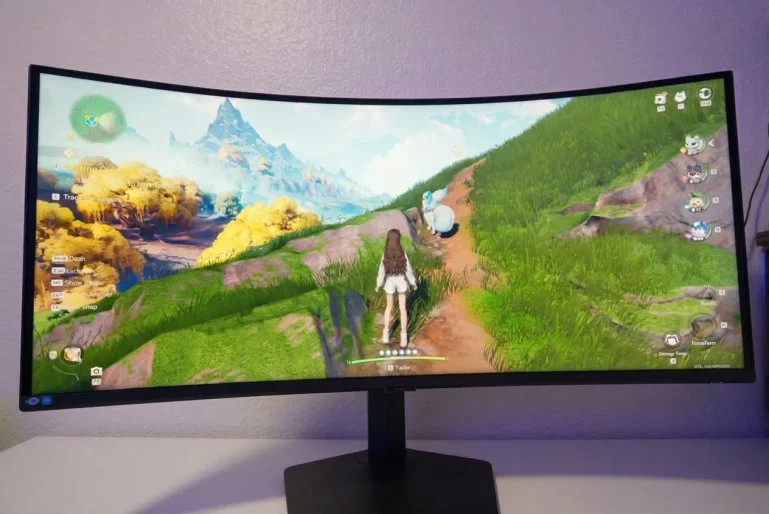
The Samsung ViewFinity S8 S85TH (starting at $1,399 USD as announced) sits at the upper end of the productivity monitor market with a rare mix of size, sharpness, and connection speed. You get a 40-inch VA panel at 5120 by 2160, 144Hz, and Thunderbolt 5 with 140W power delivery. That combination replaces a dual 4K setup for editors, coders, and analysts who want one continuous canvas.
Tradeoffs are clear. Samsung lists 350 nits typical brightness, HDR10 Plus support without local dimming, and a VA panel that shifts when viewed off center. Dell UltraSharp U4025QW counters with IPS Black and stronger viewing angles at a higher street price, while LG 40WP95C-W sells for less but caps you at 72Hz and Thunderbolt 4. If you run a modern Thunderbolt laptop and live in timelines and spreadsheets, the S85TH deserves a close look.
Editor's Take
The Samsung ViewFinity S8 S85TH gives you desktop scale, speed, and single cable docking that few productivity displays match.
Pros
- Sharp 5K2K ultrawide canvas
- Thunderbolt 5 with 140W charging
- Smooth 144Hz motion for work
- Full dock with LAN and KVM
- Immersive 1000R screen curve
Cons
- VA color shifts off angle
- Modest 350-nit brightness
- Basic HDR without local dimming
- Heavy 14 kg desk presence
At a Glance
| Spec | Details |
|---|---|
| Panel / Size | 40-inch VA, 1000R curved, 21:9 |
| Resolution | 5120 by 2160 (WUHD 5K2K) |
| Refresh Rate | Up to 144Hz, FreeSync Premium |
| Color Accuracy | 1.07B colors, 99 percent sRGB |
| Brightness | 350 nits typical, 280 nits minimum |
| HDR | HDR10 and HDR10 Plus, no local dimming |
| Inputs | Thunderbolt 5, DP 1.4, HDMI 2.1, LAN, USB hub |
| Price | $1,399 USD expected |
| Verdict | Ideal single screen upgrade for Thunderbolt laptop owners who want space and speed. |
Configurations: One Size, Fully Loaded
Samsung sells the S85TH as a single flagship. You choose the 40-inch model and you get every feature. There is no 34-inch sibling in this spec and no cheaper panel option without Thunderbolt 5.
The $1,399 USD expected price sits above mainstream 34-inch 3440 by 1440 ultrawides that often sell between $700 and $900 USD. It lands below Dell UltraSharp U4025QW, which often retails above $1,700 USD, and near LG 40WP95C-W at roughly $1,200 to $1,400 USD with older ports.
What you fund is connection headroom. Thunderbolt 5 delivers up to 80 Gbps bandwidth and 140W charging through one cable, enough for 16-inch performance laptops that exceed the 90W limit on older USB-C displays. You also get DisplayPort 1.4, HDMI 2.1, and a Thunderbolt downstream port for daisy chaining. Samsung includes HDMI and power cables. You supply your own Thunderbolt 5 cable for full speed.
Canadian buyers should watch Samsung Canada for confirmed CAD pricing. Samsung typically distributes through Best Buy Canada, Staples Canada, and Amazon.ca.
GameHaunt earns a commission when you buy through the Best Buy and Amazon links in this review.
Design: Made For a Deep, Sturdy Desk
Thin bezels frame the 40-inch surface. The rear uses matte black plastic with a stand arm that routes cables out of sight. The panel measures 928.6 by 422.8 by 198.9 mm without the stand and 928.6 by 599.9 by 362.1 mm with it attached. Weight runs 9.0 kg for the panel and 14.0 kg with the stand. Plan for a deep desk and a mount rated above 12 kg if you skip the included base.
The metal base holds firm with no wobble during typing or adjustment. Height covers 120 mm. Tilt spans minus 5 to 20 degrees. Swivel spans minus 20 to 20 degrees. VESA 100 by 100 support allows a wall mount or heavy arm, though you will want help lifting the panel.
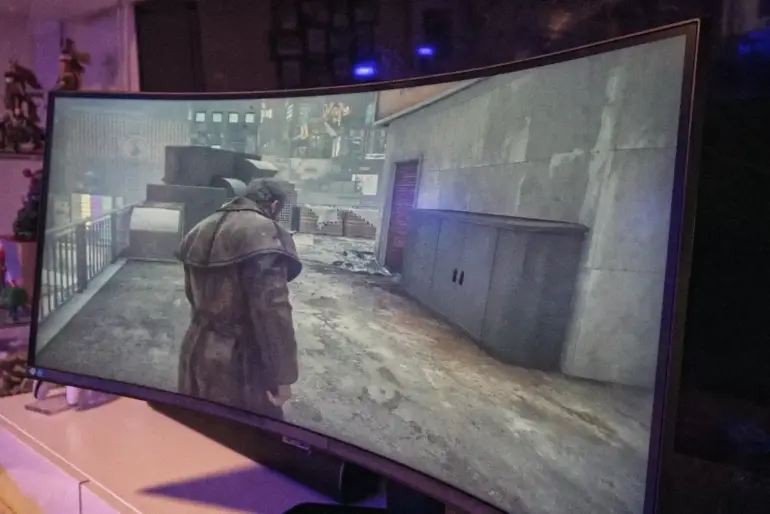
Port selection is generous. You get Thunderbolt 5 upstream with 140W charging, Thunderbolt downstream with 15W output, DisplayPort 1.4, HDMI 2.1, one USB-C upstream data port, one USB-C downstream port, five USB-A ports, one LAN port, and one headphone jack. The KVM switch links two computers to one keyboard and mouse set. Auto Source Switch Plus jumps to a newly awakened input.
Full Specifications
| Specification | Details |
|---|---|
| Panel Type | 40-inch VA, 1000R curved, 21:9 |
| Resolution | 5120 by 2160 (WUHD 5K2K) |
| Refresh Rate | Up to 144Hz |
| Response Time | 4 ms gray to gray |
| Color | 1.07B colors, 99 percent sRGB coverage |
| Brightness | 350 nits typical, 280 nits minimum |
| Contrast Ratio | 3000:1 static |
| HDR | HDR10, HDR10 Plus |
| Adaptive Sync | FreeSync Premium, Windows 11 certified |
| Ports | 1x Thunderbolt 5 (140W), 1x Thunderbolt downstream (15W), 1x DP 1.4, 1x HDMI 2.1, 1x USB-C upstream, 1x USB-C downstream, 5x USB-A, 1x LAN, 1x headphone |
| Stand | Height 120 mm, tilt minus 5 to 20 degrees, swivel minus 20 to 20 degrees, VESA 100 by 100 |
| Audio | Dual 5W speakers |
| Power | Internal AC 100 to 240V, 340W maximum |
| Dimensions | 928.6 by 599.9 by 362.1 mm with stand |
| Weight | 14.0 kg with stand, 9.0 kg without stand |
| Price | $1,399 USD expected |

Display and Workspace Features: Three Windows Without a Bezel Break
Pixel count drives this review. At 5120 by 2160 you hold ultrawide width plus extra vertical room that keeps code, timelines, and documents readable. You can pin a preview, a timeline, and a media bin side by side without stacking windows. You can stretch a large spreadsheet across the center while keeping mail and chat visible at the edges. One surface removes the center split that defines dual monitor setups.
The 1000R curve matters at this width. It pulls the far edges forward so text stays readable and mouse travel feels shorter. You still need to sit centered. Samsung claims 178 degree viewing angles, but VA contrast shifts when you move well off axis. Solo work directly in front looks consistent. Side by side client review favors IPS Black rivals.
Motion clarity separates the S85TH from most office displays. Many productivity panels stop at 60Hz or 75Hz. This one reaches 144Hz over Thunderbolt, DisplayPort, and HDMI with a capable source. Scrolling and window drags look calm and precise, which helps across long sessions. FreeSync Premium keeps pacing steady after hours, and the 4 ms response controls ghosting for casual play. Dedicated OLED gaming panels still lead for competitive shooters.
Color fits general creative work. Samsung claims 99 percent sRGB, 1.07 billion colors, and factory tuning. Web graphics and UI design look clean. The 3000:1 static contrast delivers deeper blacks than budget IPS. Samsung publishes no Delta E figure or hardware calibration workflow, so broadcast colorists should verify on a reference display.
Eye comfort and window tools help. Eye Saver Mode lowers blue light output. Picture in Picture and Picture by Picture show two inputs at once. Daisy chaining adds a second display from one laptop port.
The dock may replace a separate hub. Wired LAN gives you stable networking through the monitor. The KVM switch moves your keyboard and USB devices between two computers in seconds, useful when you split time between work and personal machines.
Dual 5W speakers cover calls and casual video with clear voices at moderate volume. Bass stays thin, so editors still need headphones for serious work.
Brightness and HDR: Know Your Room
In a typical home office the panel looks bold and dense. Text stays sharp at normal scaling. Movies show darker bars than budget IPS.
The limit is output. Samsung rates 350 nits typical and 280 nits minimum, which suits rooms with blinds or indirect light. Direct sun will wash it out. HDR10 Plus signals play correctly, but highlights lack the punch of mini LED or OLED with local dimming.
Place this display away from direct glare and it rewards you. Editors in dim suites and programmers in interior offices get the best from it.
How the Samsung ViewFinity S8 S85TH Compares
| Feature | Samsung ViewFinity S8 S85TH | Dell UltraSharp U4025QW | LG UltraWide 40WP95C-W |
|---|---|---|---|
| Panel / Size | 40-inch VA 1000R | 40-inch IPS Black curved | 40-inch IPS curved |
| Resolution | 5120 by 2160 | 5120 by 2160 | 5120 by 2160 |
| Refresh Rate | 144Hz | 120Hz | 72Hz |
| Color Accuracy | 99 percent sRGB | 99 percent DCI-P3 claimed | 98 percent DCI-P3 claimed |
| HDR | HDR10 Plus, no dimming | DisplayHDR 600 | HDR10, no dimming |
| Inputs | Thunderbolt 5 140W, DP 1.4, HDMI 2.1, LAN | Thunderbolt 4 140W, DP 1.4, HDMI 2.1, LAN | Thunderbolt 4 96W, DP 1.4, HDMI 2.0 |
| Price | $1,399 USD expected | Around $1,739 USD street | Around $1,299 USD street |
| Best For | Thunderbolt 5 laptop owners who want speed | Color consistency and wide viewing angles | Budget path to 40-inch 5K2K |
Dell wins on viewing angles and gamut claims. LG wins on entry cost if you accept slower refresh and weaker charging. Samsung wins on speed, bandwidth, and single cable power for heavy laptops.
FAQ
Is the Samsung ViewFinity S8 S85TH good for video editing and coding?
Yes for general work. The wide canvas holds timelines, previews, and code side by side, and 99 percent sRGB keeps UI colors clean. Final broadcast grading still needs a calibrated reference.
Does Thunderbolt 5 matter over Thunderbolt 4?
It matters with a Thunderbolt 5 laptop. You get up to 80 Gbps bandwidth plus 140W charging for large notebooks. Older laptops still work, but at lower link speed.
Can the S85TH handle gaming after work?
It handles casual and single player games well at 144Hz with FreeSync Premium. Competitive players should shop a dedicated OLED gaming panel for lower lag.
What is the Canadian price for the Samsung ViewFinity S8 S85TH?
Samsung had not published final CAD pricing at the time of writing. Check Samsung Canada plus Best Buy Canada, Staples Canada, and Amazon.ca for listings and warranty terms.
Where can I buy the S85TH in Canada?
Watch Samsung Canada first, then Canada Computers, Memory Express, Best Buy Canada, and Amazon.ca. Large ultrawides often arrive in waves.
Should you buy the Samsung ViewFinity S8 S85TH?
Buy it if you want one large 5K2K screen with fast refresh and strong docking for a Thunderbolt laptop. Skip it if you need wide angle color approval or true HDR punch.
Verdict: One Screen That Replaces Three Boxes
The Samsung ViewFinity S8 S85TH is the best choice for laptop first professionals who prize breadth, smoothness, and single cable simplicity. At $1,399 USD expected, it can replace a dual monitor pair, a Thunderbolt dock, and a KVM switch. Editors gain timeline room. Coders gain side by side docs. Analysts lose the bezel break.
Limits stay honest. VA shifts off axis. The 350-nit ceiling needs light control. HDR stays basic. The 14 kg build needs a firm desk. Dell remains the pick for shared viewing at a higher price. LG remains the value path at 72Hz. If you own a Thunderbolt 5 laptop and control your light, this display will serve well as a long term centerpiece.
GameHaunt Score: 4.5/5