

Building a battle station that stands out in 2026 requires more than RGB strips and a gaming chair. The Setup Wars crowd has seen every neon cave imaginable. What stops the scroll now? Texture, cultural depth, and intentional design choices that signal you care about your space beyond frame rates.
This guide covers the core components for a complete desk overhaul: furniture foundations, display hardware, peripheral upgrades, task lighting, and those finishing touches that transform a functional workspace into something worth photographing.
The Bottom Line: A cohesive battle station combines ergonomic furniture, proper lighting, floating displays, and personal touches that photograph as well as they perform during marathon sessions.
Pros:
- Height-adjustable furniture adapts between gaming and productivity
- Monitor arms free desk space for accessories and peripherals
- Proper task lighting reduces eye strain during extended use
- Cultural decor adds personality without compromising function
Cons:
- Premium furniture requires significant upfront investment
- Full setup costs approach $2,000+ when properly equipped
- Assembly time adds up across multiple products

The Foundation: Blacklyte Atlas Desk (Lighting)
Price: $1,149 CAD (on sale from $1,399 CAD) | Buy from Blacklyte
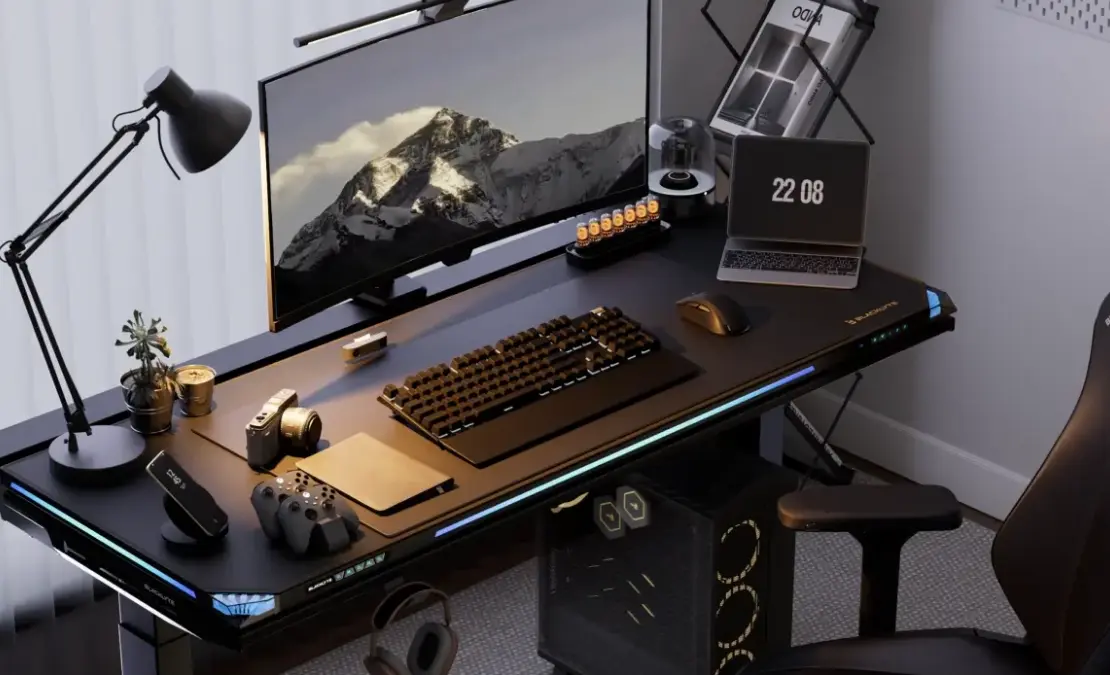
Your desk dictates everything else. A cramped surface forces compromises on monitor placement, peripheral positioning, and decorative elements. The Blacklyte Atlas Desk (Lighting) provides the surface area, height flexibility, and integrated RGB lighting that modern battle stations demand.
Electric height adjustment moves the desktop between sitting and standing positions in seconds. During ranked sessions, you stay low and focused. When editing content or taking calls, raise the desk to stretch your legs without abandoning your workflow. This flexibility matters for anyone spending 6+ hours daily at their station.
What separates the Atlas from standard standing desks: AI algorithm interactive lighting. Connect via PC software and the desk’s edge lighting reacts to in-game actions. Over 1,000 interactive effects trigger dynamically as you play. Health drops, abilities fire, kills register. The desk responds. For streamers, this creates background visual interest that reacts to gameplay without additional overlays or widgets.
The openable rear suspension pod hides cables and power strips behind an invisible flip-cover. Close it for that clean “zero-cable” aesthetic that Setup Wars judges love. Side-mounted sliding rails accept headphone hooks and accessories without drilling into the desktop.
Key Specifications:
- Electric dual-motor height adjustment with memory presets
- AI-reactive RGB edge lighting with 1,000+ effects
- Rear suspension pod for hidden cable management
- 59.1″ × 27.6″ (1500mm × 700mm) steel surface
- 275lb distributed load capacity
- 3-year warranty with optional 2-year extension
Ergonomic Seating: Razer Iskur V2 Gaming Chair
Price: $549 USD | Buy from Razer
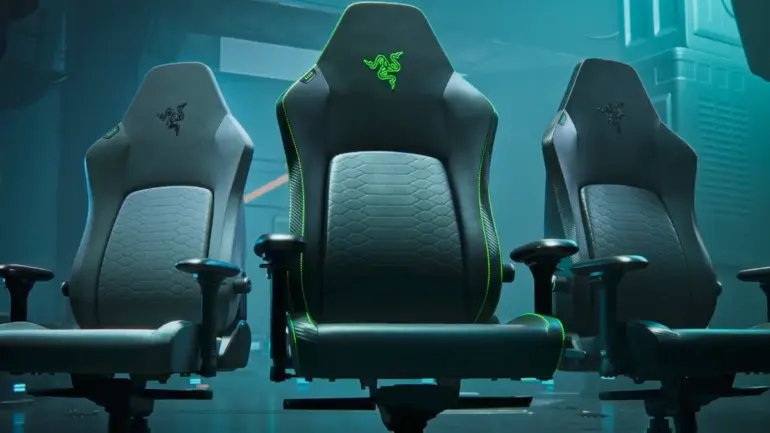
The Iskur V2 represents Razer’s answer to the ergonomic gaming chair question. The signature feature: an adaptive lumbar support system that curves and flexes with your spine position. Unlike static lumbar pillows that require constant repositioning, the Iskur V2’s built-in support dial lets you fine-tune lower back pressure in real-time.
EPU synthetic leather covers the entire chair, providing the premium feel of leather with better breathability and durability for extended sessions. The 4D armrests adjust in every direction, accommodating the forward-leaning posture of competitive gaming and the reclined position of controller play. Memory foam head cushion cradles your neck without the pressure points that cheaper foam creates.
Razer backs the Iskur V2 with a 3-year warranty covering manufacturing defects. The steel frame and high-density molded foam maintain their shape through years of daily 8+ hour sessions.
Why It Matters for Streaming: The Razer triple-headed snake logo reads instantly on camera. The chair’s silhouette signals “serious gamer” without the aggressive racing stripes that date other gaming chairs. Available in black, black/green, and limited editions that complement Razer peripheral setups.
Display Hardware: BenQ MOBIUZ EX271U Gaming Monitor
Price: $459.99 | Buy from BenQ
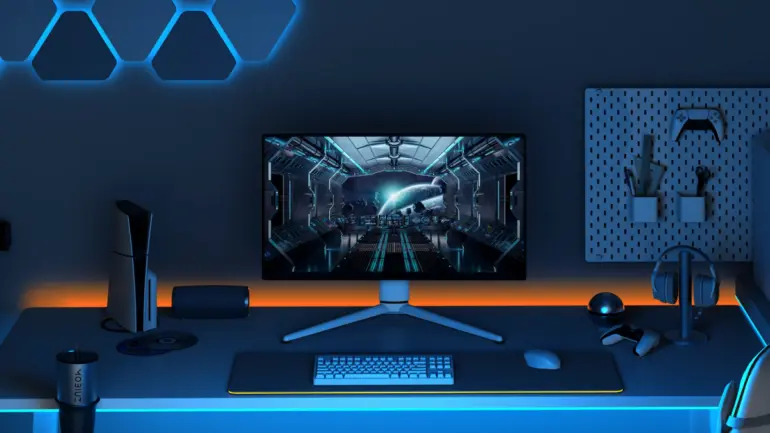
A 27-inch 4K display provides the resolution for sharp text during productivity work and the pixel density for immersive gaming. The BenQ MOBIUZ EX271U covers 95% of the DCI-P3 color gamut, delivering accurate colors for content creation alongside punchy visuals for gaming.
BenQ’s Color Shuttle software includes over 120 game-specific color profiles developed by their Color Lab team. These profiles optimize contrast and color balance for specific titles, from the golden lighting of Elden Ring to the tactical visibility requirements of competitive shooters. You download profiles for your current games and switch between them without manual calibration.
The 144Hz refresh rate handles everything outside professional esports, where you’d want 240Hz+ anyway. AMD FreeSync Premium Pro eliminates tearing without the performance overhead of older sync solutions. HDMI 2.1 connectivity supports both PC and current-gen consoles at full capability.
At $459.99, the EX271U undercuts competing 4K gaming monitors by $100-200 while matching or exceeding their specifications. For dual-monitor setups, two of these cost less than a single ultrawide of equivalent quality.
Key Specifications:
- 27-inch IPS panel, 3840×2160 resolution
- 144Hz refresh rate, 1ms GtG response time
- 95% DCI-P3 color gamut coverage
- AMD FreeSync Premium Pro
- HDMI 2.1 and DisplayPort 1.4
- Built-in speakers with treVolo sound technology
Monitor Mounting: Huanuo NITROGLIDE Dual Monitor Stand
Price: $149.99 | Buy from Amazon
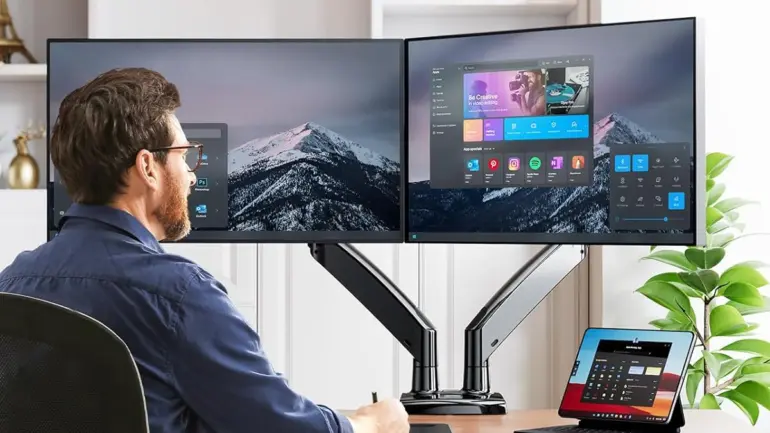
Dual monitor setups dominate gaming and content creation workflows, but two monitor stands consume valuable desk real estate. The Huanuo NITROGLIDE Dual Monitor Stand clamps to your desk edge and suspends both displays, freeing the surface beneath for peripherals, accessories, and decorative elements.
Each arm adjusts independently for height, swivel, and tilt. Position your primary gaming monitor dead center at eye level while angling the secondary display for chat, stream management, or reference materials. The gas spring mechanism holds position without sagging, even with heavier 40-inch panels. Built-in USB ports keep cable runs clean.
Compatible with monitors from 13 to 40 inches and standard VESA patterns, the arm accommodates virtually any display you own or plan to purchase. Weight capacity handles screens up to 26.4 lbs per arm, supporting even the heaviest gaming monitors.
For desk photography and streaming, floating monitors create visual depth that stands on chunky plastic bases can’t match. The visible desk surface beneath your screens provides space for the accessories and personal touches that make setups memorable.
Premium Build: The NITROGLIDE gas spring mechanism provides smoother adjustments than budget alternatives, with build quality that matches the rest of this setup.
Task Lighting: BenQ ScreenBar Halo 2
Price: $179 | Buy from BenQ
Overhead room lighting creates glare on monitors and uneven illumination across your desk surface. The BenQ ScreenBar Halo 2 mounts directly on your monitor’s top edge and projects asymmetric light downward onto your workspace without reflecting off the screen.
The Halo 2 adds rear bias lighting that illuminates the wall behind your monitor. This ambient glow reduces eye strain by softening the contrast between your bright display and dark surroundings. For late-night gaming sessions, the difference in eye fatigue becomes noticeable within the first week of use.
Third-generation ASYM-Light technology focuses 1000 lux at the desk center while maintaining zero screen glare. The wireless controller with display panel lets you adjust color temperature between 2700K (warm) and 6500K (cool) without reaching for your monitor. Real-time auto-dimming adapts output to ambient room conditions.
The 17-year rated lifespan means this purchase outlasts multiple monitor upgrades. BenQ backs this with the build quality you’d expect from a company that’s manufactured displays for decades.
For Streamers: Proper task lighting improves face cam quality by reducing the harsh shadows that overhead lights create. The warm backglow also adds visual interest to shots that include your monitor in frame.
Peripheral Ecosystem: Logitech G vs Corsair
Battle station aesthetics depend on unified design language. Mismatched peripherals from five different brands create visual chaos. Choose one ecosystem and commit.
Logitech G: The Minimalist Choice
Keyboard: G515 TKL | $109.99 | Buy from Logitech G

Tenkeyless layout shifts your mouse hand closer to your keyboard, reducing shoulder strain during extended sessions. Low-profile switches deliver faster actuation than traditional mechanical keyboards while sitting flatter against your desk.
LIGHTSPEED wireless provides wired-equivalent latency without cable management headaches. When you adjust desk height throughout the day, wireless peripherals eliminate the cable tangle that follows standing desks up and down.
Mouse: PRO X SUPERLIGHT 2 | $159.99 | Buy from Logitech G
The championship-winning 60g mouse that esports athletes actually use. HERO 2 sensor supports 44K DPI for pixel-precise tracking, while LIGHTFORCE hybrid switches survive 70 million clicks. Battery lasts 95 hours on a single charge.
Symmetrical design works for left and right-handed players. The minimal aesthetic photographs clean without RGB distractions.
Why Choose Logitech G: Unified through G HUB software. Cleaner visual aesthetic. Lower combined price ($269.98 for keyboard + mouse). Esports-proven performance.
Corsair: The Feature-Rich Choice
Keyboard: K70 RGB PRO | $169.99 | Buy from Corsair
Full-size layout with dedicated number pad and media controls. Cherry MX mechanical switches (Red, Blue, or Brown) provide the tactile feedback gamers expect. AXON technology delivers 8,000Hz hyper-polling, registering inputs 8x faster than conventional keyboards.
PBT double-shot keycaps resist shine and wear. The aluminum frame survives years of tournament abuse. Included magnetic wrist rest supports extended sessions.
Mouse: M75 Air Wireless | $99.99 | Buy from Corsair
Same 60g weight class as the PRO X SUPERLIGHT 2 at $60 less. MARKSMAN 26K sensor tracks at 650 IPS with 50G acceleration. SLIPSTREAM wireless delivers sub-1ms connection with 34-hour battery life (100 hours via Bluetooth).
Symmetrical shape suits any grip style. Available in black, white, and gray to match your setup’s color scheme.
Why Choose Corsair: iCUE software syncs lighting across your entire Corsair ecosystem (RAM, fans, coolers). More features per dollar. Cherry MX switch variety. Tournament-proven durability.


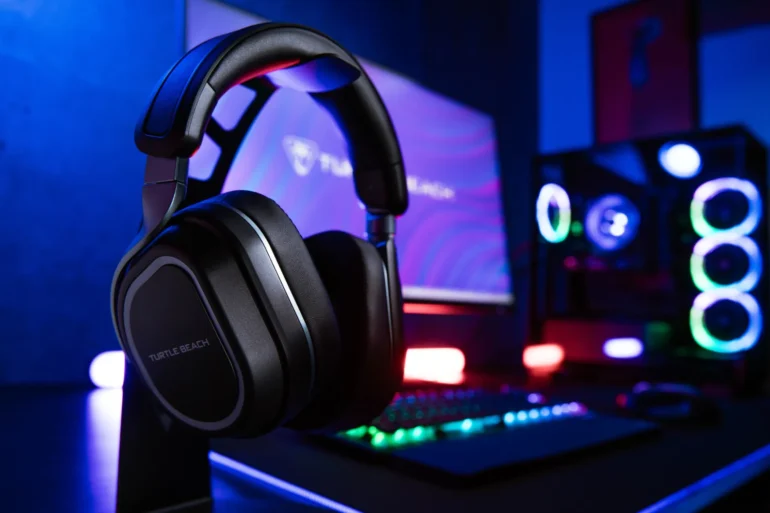
Audio: Turtle Beach Stealth 700 Gen 3 Headset
Price: $199.99 | Buy from Turtle Beach
Audio quality separates average setups from immersive ones. The Turtle Beach Stealth 700 Gen 3 delivers spatial audio through 60mm Eclipse dual drivers, larger than most gaming headsets and capable of reproducing the directional cues that competitive games demand.
The headset supports simultaneous 2.4GHz wireless and Bluetooth 5.2 connections. Game audio streams through the low-latency wireless link while Discord calls or music play over Bluetooth from your phone. No cable swapping, no audio mixing headaches. The QuickSwitch button toggles between sources instantly.
Battery life hits 80 hours with quick charge support. Plug in for 15 minutes and gain hours of playtime. For multi-day gaming sessions or tournament weekends, you won’t reach for a charger.
The flip-to-mute microphone folds into the earcup when not in use, keeping the headset looking clean for desk photography. Turtle Beach’s noise reduction technology keeps your voice clear without picking up keyboard clicks or background chatter.
Key Specifications:
- 60mm Eclipse dual drivers for spatial audio
- Simultaneous 2.4GHz wireless + Bluetooth 5.2
- 80-hour battery life with quick charge
- Flip-to-mute microphone with noise reduction
- Available for Xbox, PlayStation, and PC
Budget Alternative: The Turtle Beach Stealth 600 Gen 3 ($109.99) delivers the same 80-hour battery life and dual connectivity in a slightly more compact package.
The Finishing Touches: Cultural Decor
The 2026 LEGO Lunar New Year collection provides desk accessories that read as intentional art rather than toy clutter. Three pieces fit naturally into gaming setups:
Fortune Master ($29.99, 386 pieces): Standing 13cm tall, this figure tucks perfectly under a monitor stand or beside a microphone arm. Three interchangeable eye sets allow mood-based customization. Red and gold accents photograph well under task lighting.
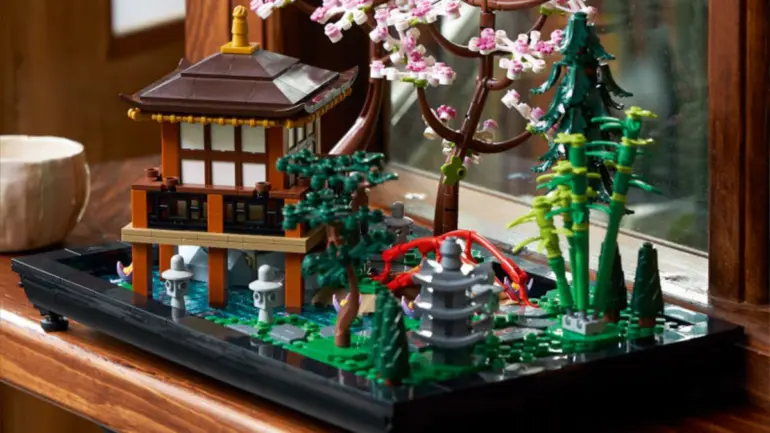
Tranquil Garden ($109.99, 1,363 pieces): A Japanese-inspired garden with rearrangeable elements. Slots in the base let you reconfigure the layout whenever the mood strikes. The pavilion opens to reveal a detailed tea-ceremony room. At roughly 12.5 x 10 inches, it anchors a desk corner without overwhelming the space.

Galloping Horses Canvas ($109.99, 1,650 pieces): A 3D art piece where brick-built horses emerge from a printed canvas. Turn the crank and they gallop. For streamers, this adds a dynamic background element that catches attention without distracting from content.
These pieces signal cultural awareness and design intentionality. They’re the desk equivalent of hanging actual art instead of gaming posters.
Complete Setup: Component Pricing
| Component | Product | Price |
|---|---|---|
| Desk | Blacklyte Atlas Desk (Lighting) | $1,149 CAD |
| Chair | Razer Iskur V2 Gaming Chair | $549 USD |
| Primary Monitor | BenQ MOBIUZ EX271U (x2) | $919.98 USD |
| Monitor Mount | Huanuo NITROGLIDE Dual Monitor Stand | $149.99 USD |
| Lighting | BenQ ScreenBar Halo 2 | $179 USD |
| Headset | Turtle Beach Stealth 700 Gen 3 | $199.99 USD |
| Keyboard | Logitech G515 TKL | $109.99 USD |
| Mouse | Logitech PRO X SUPERLIGHT 2 | $159.99 USD |
| Decor | LEGO Tranquil Garden | $109.99 USD |
| Accent | LEGO Fortune Master | $29.99 USD |
Estimated Total: ~$2,865 USD (assuming CAD to USD conversion at current rates)
Scale this budget up or down based on priorities. The monitor arm and desk provide the most dramatic visual transformation per dollar. The chair delivers the most significant quality-of-life improvement for daily use.
Budget Alternatives
Entry Level (~$700):
- Existing desk with cable management additions
- Huanuo Dual Monitor Arm ($35)
- BenQ ScreenBar (original, $109)
- Turtle Beach Stealth 500 headset ($89.99)
- Logitech G413 TKL SE keyboard ($59.99)
- Logitech G305 LIGHTSPEED mouse ($59.99)
- LEGO Fortune Master ($29.99)
Mid-Range (~$1,600):
- Blacklyte Atlas Lite Standing Desk ($749 CAD)
- Existing chair with lumbar pillow upgrade
- Huanuo Dual Monitor Arm ($35)
- BenQ ScreenBar Pro ($139)
- Turtle Beach Stealth 600 Gen 3 headset ($109.99)
- Logitech G515 TKL keyboard ($109.99)
- Corsair M75 Air Wireless mouse ($99.99)
- LEGO Tranquil Garden ($109.99)
FAQ
Is a standing desk worth it for gaming?
Height adjustment matters more for hybrid gaming/productivity setups. If you work at the same desk where you game, the ability to stand during calls and sit during matches prevents the fatigue that comes from 8+ hours in one position.
Can I use the BenQ ScreenBar with curved monitors?
The ScreenBar Halo 2 supports monitors curved up to 1000R. The standard ScreenBar works with curves up to 1800R. Check your monitor’s curvature specification before purchasing.
Does the Huanuo arm work with ultrawide monitors?
The single-arm variant supports ultrawides. The dual-arm model reviewed here suits two standard displays. Weight capacity of 17.6 lbs per arm handles most 34-inch ultrawides.
How long does the Blacklyte desk take to assemble?
Expect 45-60 minutes for solo assembly. The motor and electronics come pre-installed. You’re primarily attaching legs and the desktop surface.
Does the Turtle Beach headset work with multiple platforms?
The Stealth 700 Gen 3 comes in Xbox, PlayStation, and PC variants. Each version supports its native platform plus Bluetooth connectivity to phones, tablets, and other devices. You can game on console while taking Discord calls from your PC simultaneously.
Are LEGO sets appropriate for professional-looking setups?
The Lunar New Year collection targets adult builders (18+ rating on some sets). The aesthetic reads as cultural decor rather than children’s toys. Many professional streamers and content creators display similar pieces.
What’s the warranty on Blacklyte furniture?
Blacklyte offers a standard warranty with an available 5-year extension. Lifetime technical support covers adjustment guidance and troubleshooting.

