
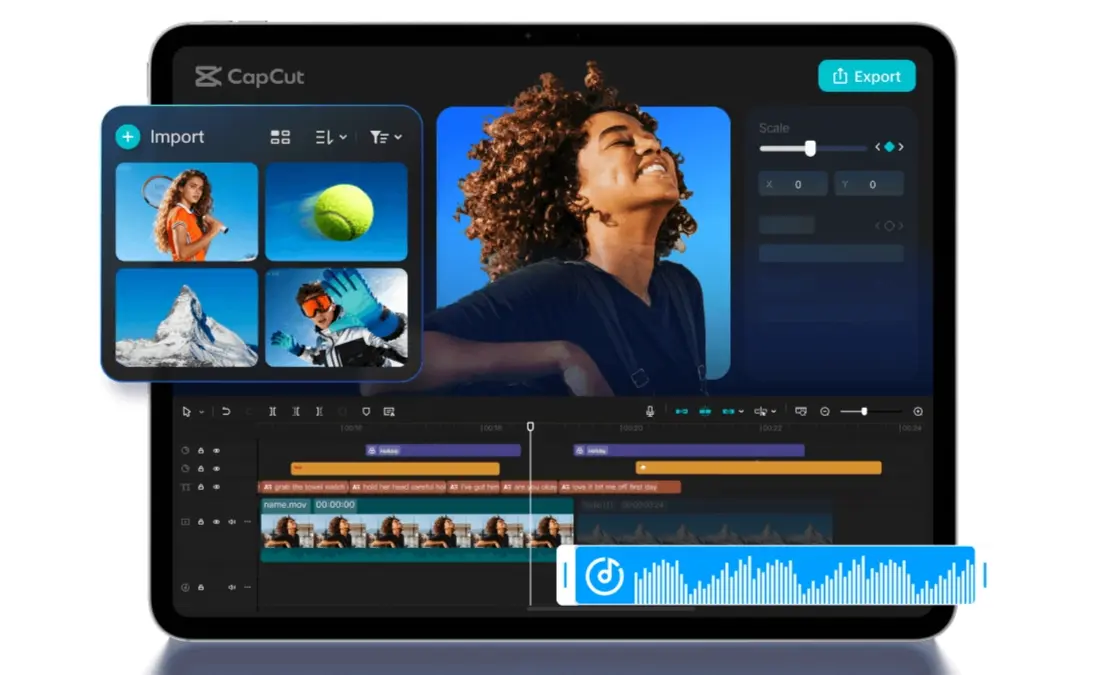

CapCut’s new iPad app delivers multi-track timelines, precise keyframes, and Apple Pencil support, making highlight reels and stream clips faster than ever. It’s free for a limited time.
CapCut has officially launched CapCut Pad Pro on iPad, introducing a desktop-grade editing experience designed for creators who value speed without sacrificing control. Available free for a limited time, the new app combines multi-track timelines, precise keyframe control, batch multi-selection, a larger canvas, and multi-window interaction. For gaming creators and streamers who need fast edits between matches or after a stream ends, this hits a practical sweet spot.
Why Streamers Should Care About CapCut Pad Pro
For streamers working across Twitch, YouTube, TikTok, and Reels, CapCut Pad Pro’s multi-track editing means you can stack gameplay, facecam, chat overlays, music, captions, and sound effects on separate tracks. You finesse moments with keyframe zooms, motion, and timing for punchier highlights. Batch selection speeds up repetitive trims and repositioning across multiple clips, while the larger iPad canvas and multi-window support make it easier to manage assets, templates, and exports side by side.
Compared to mobile, it’s more powerful. Compared to desktop, it’s more convenient for rapid edits and fast exports away from your desk. That middle ground works for creators who want pro-level control without staying tethered to a PC.
Key Features for Gaming Creators
CapCut Pad Pro includes several features that directly benefit gaming and streaming workflows:
- Multi-track timelines: Layer gameplay, facecam, captions, chat overlay, and music on separate tracks.
- Keyframe precision: Zooms, pans, and timing adjustments for beat-synced highlights.
- Batch multi-selection: Move, trim, and adjust multiple clips at once.
- Larger editing canvas: Better visibility for complex edits and layouts.
- Multi-window interaction: Reference assets or templates while you edit.
- Apple Pencil support: Fine-tune masks, titles, and transitions with tactile control.
The Apple Pencil integration deserves special attention. You get faster scrubbing, frame-accurate cuts, and pinpoint keyframe adjustments. That translates into quicker vertical shorts, reaction clips, and turnarounds when you want to capitalize on live momentum.
Practical Use Cases for Streamers
Stream highlight factory: Cut 30 to 90 second hype moments from VODs with captions and motion effects. The multi-track timeline handles the facecam overlay, gameplay footage, and chat reactions in separate lanes.
Shorts-ready vertical edits: Crop, protect safe areas, and add dynamic zooms for TikTok and Reels. The larger canvas makes it easier to see where text falls relative to platform UI elements.
Stream asset creation: Build lower-thirds, stingers, and scene transitions on the couch. You don’t need to fire up a desktop to create quick overlays.
Between-match edits: Fast trims and exports during downtime at events or LANs. The iPad portability means you can edit without hauling a full laptop setup.
Social-first workflows: Rapid clips for tournament recaps and creator collabs. The batch selection feature cuts down on repetitive repositioning.
How CapCut Pad Pro Compares to Mobile and Desktop
The mobile version of CapCut works for quick edits, but the single-track workflow and smaller screen limit what you can accomplish with complex projects. Desktop editing apps like DaVinci Resolve or Premiere Pro offer maximum control, but they require you to sit at your workstation.
CapCut Pad Pro occupies the space between. You get multi-track editing and keyframe control (desktop features) with touch and Pencil workflows (tablet convenience). For streamers who travel, attend events, or simply want to edit from the couch after a stream, that combination makes sense.
The app supports full touch workflows, so you’re not fighting a mouse-centric interface on a touchscreen. You pinch to zoom the timeline, drag clips with your finger, and use the Pencil for precision work when you need it.

Availability and Pricing
CapCut Pad Pro for iPad is free for a limited time. That window makes it an easy recommendation for creators and students testing iPad-first editing, especially those who want desktop control without the desktop. Early adoption is likely to drive strong engagement while the free period lasts.
CapCut hasn’t announced when the free period ends or what pricing looks like afterward. If you’re considering the app, downloading during the free window removes any barrier to testing.
Who Should Download CapCut Pad Pro
Good fit:
- Streamers who create highlight clips and shorts from VODs
- Gaming creators who want faster turnaround on social content
- iPad owners (especially those with Apple Pencil) looking for a desktop-level editor
- Creators who travel or edit away from their primary workstation
- Anyone testing iPad-first workflows for the first time

Not ideal for:
- Creators who need advanced color grading or audio mixing (desktop apps still win)
- Users without an iPad
- Projects requiring third-party plugin support
FAQ
Is CapCut Pad Pro really free?
Yes, for a limited time. CapCut hasn’t announced end dates or future pricing, so downloading now locks in free access during the promotional period.
Does CapCut Pad Pro work with Apple Pencil?
Yes. The app supports full Apple Pencil input for precision timeline scrubbing, keyframe adjustments, masking, and annotation.
Can I use CapCut Pad Pro for YouTube Shorts and TikTok?
Absolutely. The app handles vertical exports, safe-area framing, and the dynamic zooms common in short-form content.
How does CapCut Pad Pro compare to the mobile app?
The iPad version offers multi-track editing, batch selection, a larger canvas, and multi-window support. The mobile app uses a simpler single-track interface.
Do I need an internet connection to edit?
You can edit offline, though some features (cloud assets, AI tools) may require connectivity.
What iPad models support CapCut Pad Pro?
CapCut hasn’t published a minimum spec list, but expect support for iPads running recent versions of iPadOS. Older models may experience performance limitations on complex projects.
Download CapCut Pad Pro
CapCut Pad Pro is available now on the App Store for iPad. The free access window won’t last forever, so if you want to test desktop-level editing on your tablet, now is the time.
Download CapCut Pad Pro on the App Store
Disclosure: This article contains affiliate links. If you download through our links, we may earn a commission at no extra cost to you.

