
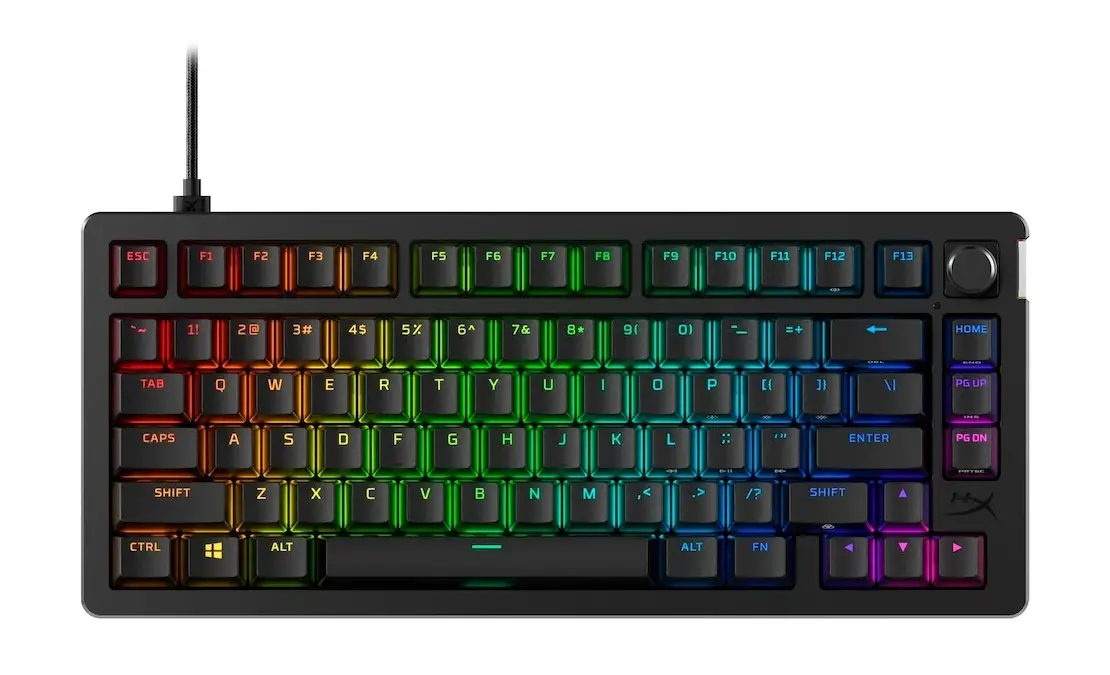

Hall effect switches, rapid trigger technology, and wireless connectivity have transformed the gaming keyboard market. We spent months testing mechanical keyboards from Razer, SteelSeries, HyperX, Corsair, and Logitech to find the best gaming keyboard for every budget and use case. Whether you need a gaming keyboard for competitive esports, a keyboard for work that doubles as your gaming companion, or the best budget option under $100, this guide breaks down our tested picks.
The Bottom Line: The Razer Huntsman V3 Pro dominates competitive gaming with its analog optical switches and adjustable actuation. For wireless gaming, the SteelSeries Apex Pro TKL Wireless delivers adjustable actuation without cables. Budget shoppers win with the Logitech G413 SE’s solid build quality at an accessible price, while the HyperX Alloy Rise 75 offers unique customization options for style-conscious gamers.
At a Glance: Quick Recommendations
Prices reflect tested configurations as of December 2025. Some links below use affiliate partnerships that support our independent testing at no additional cost to you.
| Category | Our Pick | Switch Type | Form Factor | Price | Where to Buy |
|---|---|---|---|---|---|
| Best Overall | Razer Huntsman V3 Pro | Analog Optical | TKL | $249 | Razer.com |
| Best Wireless | SteelSeries Apex Pro TKL Wireless | Hall Effect | TKL | $249 | SteelSeries.com |
| Best Value | HyperX Alloy Rise 75 | Mechanical | 75% | $179 | HyperX.com |
| Best Budget | Logitech G413 SE | Mechanical | TKL | $69 | Logitech.com |
| Best Full-Size | Razer BlackWidow V4 Pro | Optical | Full-Size | $229 | Razer.com |
| Best Premium | Corsair K100 RGB | Optical | Full-Size | $229 | Corsair.com |
| Best Low-Profile | Logitech G915 X TKL | Mechanical | TKL | $229 | Logitech.com |
Best Overall: Razer Huntsman V3 Pro
$249 | Check price at Razer
The Razer Huntsman V3 Pro delivers the best gaming keyboard experience for competitive players who demand precision and adjustable performance. This TKL keyboard features Razer’s second-generation analog optical switches with adjustable actuation from 0.1mm to 4.0mm, providing the same rapid trigger capabilities that hall effect keyboards popularized. In games like Valorant and Counter-Strike 2, the adjustable actuation provides a genuine competitive edge that traditional mechanical switches cannot match.
The analog optical switch technology uses light-based actuation instead of physical contacts, enabling both adjustable actuation points and pressure-sensitive analog input. You can set hair-trigger sensitivity for gaming while maintaining comfortable actuation for typing. During our testing, the switches felt crisp and responsive across thousands of keypresses, with Razer’s 100 million keypress durability rating ensuring long-term reliability.
Build quality impressed throughout testing. The aluminum top plate adds rigidity and premium feel, while the included magnetic wrist rest provides comfortable support during extended sessions. Razer’s Synapse software offers extensive customization for macros, lighting, and per-key actuation settings.
Key Features:
- Razer Analog Optical Gen-2 switches with 0.1mm to 4.0mm adjustable actuation
- Rapid trigger for instant re-registration without full key release
- Analog input support for pressure-sensitive controls in compatible games
- 8000Hz polling rate for competitive response times
- Per-key RGB lighting with Razer Chroma integration
The Trade-offs: The $249 price tag matches premium competitors. The TKL layout eliminates the number pad that productivity users may need. Razer Synapse software, while powerful, requires installation for full functionality. No wireless option exists for the V3 Pro specifically.
Specs:
- Switch Type: Razer Analog Optical Gen-2 (linear)
- Form Factor: TKL (tenkeyless keyboard)
- Connectivity: Wired USB-C
- Polling Rate: 8000Hz
- RGB: Per-key with Razer Chroma
- Weight: 1.8 pounds
Who Should Buy: Competitive FPS and rhythm game players who want adjustable actuation and rapid trigger capabilities. Gamers looking for the best optical switch keyboard with proven performance. Players who value Razer’s ecosystem integration with other Chroma-enabled devices.
Best Wireless Gaming Keyboard: SteelSeries Apex Pro TKL Wireless
$249 | Check price at SteelSeries
The SteelSeries Apex Pro TKL Wireless delivers the best wireless gaming keyboard experience we’ve tested, combining hall effect switches with lag-free 2.4GHz connectivity. This TKL layout preserves function keys and arrow clusters while eliminating the number pad, striking the balance competitive gamers prefer. The OmniPoint 2.0 adjustable switches offer 0.2mm to 3.8mm actuation, putting rapid trigger capabilities in a wireless package.
Battery life impressed during our testing. SteelSeries claims 40 hours with RGB enabled, and our real-world usage came close to that figure. The keyboard charges via USB-C and supports wired operation while charging, so you never face downtime during marathon gaming sessions.
Build quality exceeds expectations for a wireless keyboard. The aluminum top plate adds rigidity without excessive weight, and the magnetic wrist rest attaches securely. The OLED display on the top right corner shows system information, Discord notifications, and game-specific data through SteelSeries GG software integration.
Key Features:
- OmniPoint 2.0 adjustable mechanical switches (0.2mm to 3.8mm actuation)
- Dual wireless: 2.4GHz for gaming, Bluetooth for productivity
- 40-hour battery life with RGB enabled
- Integrated OLED smart display
- Aircraft-grade aluminum frame with magnetic wrist rest
The Trade-offs: The $249 price tag puts this among the most expensive TKL keyboards on the market. The switches, while adjustable, don’t quite match the Wooting’s rapid trigger implementation in competitive scenarios. The wireless model adds weight compared to wired alternatives.
Specs:
- Switch Type: OmniPoint 2.0 Adjustable
- Form Factor: TKL (tenkeyless keyboard)
- Connectivity: 2.4GHz wireless, Bluetooth, USB-C wired
- Polling Rate: 1000Hz wireless, 8000Hz wired
- Battery Life: 40 hours (RGB on), 140 hours (RGB off)
- Weight: 2.1 pounds
Who Should Buy: Gamers who want hall effect performance without cables. Players who value the TKL form factor with wireless convenience. Anyone seeking a premium gaming keyboard with excellent build quality and adjustable switches.
Best Value: HyperX Alloy Rise 75 Wireless
$179 | Check price at HyperX
The HyperX Alloy Rise 75 delivers something unique among the best gaming keyboards: genuine aesthetic customization alongside solid gaming performance. This wireless gaming keyboard features a magnetic top plate that lifts off to reveal customization options, with additional plates available in black, white, or navy. A removable metal badge on the side of the keyboard adds another layer of personalization that competitors simply don’t offer.
The keyboard uses HyperX’s pre-lubed linear switches with a 1.8mm actuation point, providing quick response for gaming without the adjustment period some hall effect switches require. Hot-swap capability means you can replace these mechanical switches with alternatives later, adding long-term flexibility to your purchase. The typing feel remains comfortable for extended sessions, though enthusiasts may want to swap in premium switches eventually.
Dual wireless connectivity through Bluetooth or 2.4GHz covers both gaming and productivity needs. Battery life reaches 80 hours with RGB disabled, dropping to around 30 hours with full backlight enabled. An ambient light sensor automatically adjusts RGB brightness based on room lighting, helping conserve battery without manual intervention.
Key Features:
- Magnetic top plate with swappable customization options
- Removable metal badge for personalization
- Hot-swappable mechanical switches (pre-lubed HyperX linear)
- Dual wireless: 2.4GHz and Bluetooth connectivity
- Ambient light sensor for automatic RGB brightness adjustment
- 80 hours battery life (RGB off), 30 hours (RGB on)
The Trade-offs: The keyboard isn’t equipped with hall effect switches, missing the rapid trigger capabilities competitive players increasingly expect. The plastic construction creaks when flexed, and build quality doesn’t match full aluminum alternatives. The keycaps feature a rough texture that some users find tacky.
Specs:
- Switch Type: HyperX Linear Red Mechanical (1.8mm actuation)
- Form Factor: 75%
- Connectivity: 2.4GHz wireless, Bluetooth, USB-C wired
- Polling Rate: 1000Hz
- Battery Life: 80 hours (RGB off), 30 hours (RGB on)
- Weight: 2.1 pounds
Who Should Buy: Gamers who want unique aesthetic customization options their setup reflects. Players seeking a hot-swappable keyboard with wireless convenience at a reasonable price. Anyone who values the 75% layout for gaming and typing without sacrificing essential keys.
Best Budget: Logitech G413 SE
$69 | Check price at Logitech
The Logitech G413 SE proves that budget mechanical keyboards can deliver genuine gaming performance without breaking the bank. For $69, you get tactile mechanical switches, a brushed aluminum top case, and the reliability Logitech has built over decades of peripheral manufacturing. This great keyboard handles both gaming and typing with build quality that exceeds its modest price tag.
The tactile mechanical switches provide satisfying feedback with each keypress, striking a balance between the quiet operation of linear switches and the pronounced click of blue switches. Logitech rates these switches for 70 million keypresses, ensuring years of reliable gaming before any degradation. The 6-key rollover prevents ghosting during intense gaming sessions where multiple simultaneous inputs matter.
Build quality impressed for the price point. The brushed 5052 aluminum-magnesium alloy top case adds rigidity and premium feel that plastic alternatives cannot match. White LED backlighting with adjustable brightness levels provides visibility in dark rooms without the complexity of full RGB. PBT keycaps resist shine and wear better than the ABS keycaps found on most budget keyboards.
Key Features:
- Tactile mechanical switches rated for 70 million keypresses
- Brushed aluminum-magnesium alloy top case
- PBT keycaps for durability and texture
- White LED backlighting with adjustable brightness
- 6-key rollover anti-ghosting
- USB passthrough for mouse or headset
The Trade-offs: No RGB lighting limits customization options for gamers who want colorful setups. The TKL layout lacks a number pad for productivity tasks. No wireless connectivity means cable management becomes necessary. The tactile switches may feel too heavy for gamers preferring light linear switches.
Specs:
- Switch Type: Logitech Tactile Mechanical
- Form Factor: TKL (tenkeyless keyboard)
- Connectivity: Wired USB
- Polling Rate: 1000Hz
- Lighting: White LED (adjustable brightness)
- Weight: 1.6 pounds
Who Should Buy: First-time mechanical keyboard buyers who want quality without premium pricing. Gamers on a budget who refuse to compromise on build quality. Anyone seeking a reliable TKL keyboard from a trusted brand without RGB complexity.
Best Full-Size: Razer BlackWidow V4 Pro
$229 | Check price at Razer
The Razer BlackWidow V4 Pro delivers everything a full-size keyboard should offer: dedicated macro keys, a comfortable magnetic wrist rest, and optical switches rated for 100 million keypresses. For MMO players, streamers, and productivity power users who need a keyboard for work that handles gaming equally well, the BlackWidow V4 remains the full-size keyboard to beat.
Razer’s optical switches actuate via light beam rather than physical contact, providing faster response times than traditional mechanical switches. The switches feel crisp with satisfying feedback, though the sound profile runs louder than silent alternatives. You can choose between linear, tactile, or clicky variants depending on your preference.

The dedicated macro column on the left provides five programmable keys that Razer Synapse software can map to complex sequences. The command dial on the top right handles volume by default but can control brightness, zoom, or application-specific functions. Eight media keys join the dial for comprehensive media control without reaching for FN combinations.
Key Features:
- Razer Gen-3 Optical Switches (100 million keypress lifespan)
- Dedicated 5-key macro column for MMO and streaming
- Command dial with 8 dedicated media keys
- Magnetic leatherette wrist rest included
- Underglow RGB with 38 customization zones
- Doubleshot ABS keycaps with side-printed secondary functions
The Trade-offs: The full-size layout consumes significant desk space, limiting mouse movement for low-sensitivity players. At 2.9 pounds without the wrist rest, portability isn’t a consideration. The $229 price positions this above many TKL alternatives with hall effect switches. No wireless option exists for this model.
Specs:
- Switch Type: Razer Gen-3 Optical (Linear/Tactile/Clicky options)
- Form Factor: Full-size with macro column
- Connectivity: USB-C wired (detachable cable)
- Polling Rate: 8000Hz
- RGB: Per-key with underglow
- Weight: 2.9 pounds (without wrist rest)
Who Should Buy: MMO and MMORPG players who use extensive macro bindings. Streamers who need dedicated keys for scene switching and audio control. Productivity users who require a number pad alongside gaming capabilities.
Best Premium: Corsair K100 RGB
$229 | Check price at Corsair
The Corsair K100 RGB delivers the most feature-rich premium gaming keyboard experience money can buy. This full-size powerhouse combines Corsair’s OPX optical switches with an iCUE control wheel, dedicated macro keys, and build quality that justifies every dollar of its price tag. For gamers who want everything in one package without compromise, the K100 remains the keyboard to beat.
The OPX optical switches actuate at 1.0mm with a 4000Hz polling rate, providing response times that rival hall effect alternatives. Corsair rates these switches for 150 million keypresses, exceeding the durability of most mechanical switches on the market. The typing feel lands between linear and tactile, offering smooth keypresses with subtle feedback that works equally well for gaming and typing.
The iCUE control wheel on the top left sets the K100 apart from competitors. This programmable dial handles volume by default but can control anything from brush size in Photoshop to zoom levels in strategy games. Six dedicated macro keys flank the left side, providing instant access to complex commands without reaching for function layers.
Key Features:
- Corsair OPX optical switches (1.0mm actuation, 150M keypresses)
- 4000Hz polling rate for competitive response times
- iCUE control wheel with contextual programming
- 6 dedicated macro keys with onboard storage
- Aircraft-grade aluminum frame with magnetic wrist rest
- Per-key RGB with 44-zone LightEdge
The Trade-offs: The full-size layout with macro column consumes significant desk space. At 2.6 pounds, portability isn’t a consideration. No wireless option limits desk flexibility. The iCUE software, while powerful, demands more system resources than lighter alternatives.

Specs:
- Switch Type: Corsair OPX Optical (linear-tactile hybrid)
- Form Factor: Full-size with macro column
- Connectivity: USB-C wired (detachable cable)
- Polling Rate: 4000Hz
- RGB: Per-key with 44-zone LightEdge
- Weight: 2.6 pounds
Who Should Buy: Enthusiasts who want every feature in a single keyboard. Gamers and creators who value the iCUE control wheel for workflow integration. Players seeking optical switch speed without hall effect pricing.
Best Low-Profile: Logitech G915 X TKL
$229 | Check price at Logitech
The Logitech G915 X TKL perfects the low-profile gaming keyboard formula. The redesigned GL switches sit 25% lower than traditional mechanical switches, creating a typing experience closer to laptop keyboards while maintaining the tactile feedback gamers expect. For players who find standard keyboards too tall or fatiguing, the G915 X delivers comfort without sacrificing gaming performance.
Battery life reaches an impressive 36 hours with full RGB enabled, extending to 800 hours with lighting disabled. The LIGHTSPEED wireless technology provides sub-1ms latency that matches wired connections in our testing. Bluetooth connectivity supports additional devices for seamless productivity switching.
The slim profile (0.87 inches at the tallest point) eliminates the need for a wrist rest while maintaining comfortable ergonomics. The aircraft-grade aluminum construction adds durability without excessive weight, making this a genuinely portable wireless keyboard despite its TKL size.
Key Features:
- GL Tactile/Linear/Clicky low-profile mechanical switches
- LIGHTSPEED 2.4GHz wireless with sub-1ms latency
- 36 hours battery (RGB on), 800 hours (RGB off)
- Aircraft-grade aluminum top case
- LIGHTSYNC RGB with G HUB integration
- Programmable G-keys and media controls
The Trade-offs: The $229 price matches full-height alternatives with more features. Low-profile switches require adjustment for users accustomed to standard keyboards. The reduced key travel may feel less satisfying for typing. No hot-swap capability limits switch customization.
Specs:
- Switch Type: Logitech GL (Tactile/Linear/Clicky)
- Form Factor: TKL (low-profile)
- Connectivity: LIGHTSPEED 2.4GHz, Bluetooth, USB-C
- Polling Rate: 1000Hz
- Battery Life: 36 hours (RGB on), 800 hours (RGB off)
- Weight: 1.8 pounds
Who Should Buy: Gamers who prefer laptop-style keyboards with mechanical feedback. Players seeking reduced wrist strain from lower key height. Anyone who wants a portable wireless keyboard that travels easily.
How to Choose: Key Buying Considerations
Switch Technology: What Actually Matters
Hall Effect Switches: Magnetic sensors enable rapid trigger and adjustable actuation from 0.1mm to 4.0mm. Essential for competitive FPS players, optional for everyone else. Keyboards use hall effect switches that never wear out from contact degradation.
Mechanical Switches: Traditional spring-loaded switches with physical contacts. Available in linear, tactile, and clicky variants. Hot-swappable keyboards let you experiment with different switch types. Reliable technology with decades of refinement.
Optical Switches: Light-based actuation provides faster response than mechanical switches without hall effect pricing. The Razer BlackWidow V4 and similar keyboards offer optical switches rated for 100 million keypresses. A middle ground between mechanical and hall effect.
Form Factor: TKL vs. Full-Size vs. Compact
TKL (Tenkeyless): Eliminates the number pad to free mouse space. The preferred choice for competitive gamers who use low sensitivity settings. TKL keyboards preserve function keys and navigation clusters.
Full-Size: Includes dedicated number pad for productivity and data entry. Best for streamers, MMO players, and anyone who needs macro keys alongside gaming. Consumes more desk space.
75% Layout: Compact keyboards that retain function rows and arrow clusters in a smaller footprint. The right keyboard for gamers who want portability without losing essential keys.
60% Layout: Minimal footprint with no function row, arrows, or navigation. Requires layer access for missing keys. Best 60 option for pure competitive gaming.
Wireless vs. Wired: Is Lag Still a Concern?
Modern 2.4GHz wireless gaming keyboards deliver sub-1ms latency that matches or exceeds many wired keyboards. The best wireless gaming keyboard options from SteelSeries, Logitech, and HyperX eliminate the wire without performance compromise. Bluetooth works for productivity but introduces latency unsuitable for competitive play.
Wired keyboards remain relevant for tournament players who cannot risk battery death and gamers who simply don’t want another device to charge. A wired keyboard also costs less than wireless alternatives with identical features.
How We Test Gaming Keyboards
When we test gaming keyboards, we evaluate multiple factors across extended usage periods. Latency testing using specialized hardware measures actual response time from keypress to on-screen action. We compare results against manufacturer claims and competing products to provide objective performance data.
Switch feel and sound receive particular attention because they define the keyboard’s character. We type thousands of words and play dozens of hours across various game genres to assess performance under different conditions. Stabilizer quality, case acoustics, and build quality contribute to our subjective evaluations of typing feel and gaming experience.
Software testing examines functionality, stability, and resource usage. Bloated companion apps that consume system resources while providing minimal utility receive criticism. We evaluate onboard memory for storing profiles, eliminating software dependency for tournament or multi-computer usage.
FAQ
Is a hall effect keyboard worth the extra cost?
For competitive FPS and rhythm game players, yes. Rapid trigger provides measurable advantages in games requiring precise movement input. For casual gaming, RPGs, and single-player titles, traditional mechanical switches perform identically at lower cost.
Should I buy a TKL or full-size keyboard?
TKL if you prioritize mouse space for gaming. Full-size if you need a number pad for productivity or use extensive macro keys for MMOs and streaming. The 75% layout offers a middle ground.
How does the HyperX Alloy Rise 75 compare to hall effect alternatives?
The Alloy Rise 75 offers unique aesthetic customization through its magnetic top plate and badge system, plus hot-swap capability for switch experimentation. However, it lacks hall effect switches and rapid trigger, putting competitive players at a disadvantage against Razer and SteelSeries alternatives with adjustable actuation.
Can wireless keyboards compete with wired for gaming?
Yes. The best wireless gaming keyboards deliver sub-1ms latency through 2.4GHz connections, matching wired performance. Bluetooth adds latency and should be reserved for productivity use.
What polling rate do I actually need?
1000Hz suffices for most gamers, registering inputs every 1ms. Higher polling rates (4000Hz, 8000Hz) provide marginal benefits in competitive scenarios but aren’t noticeable for casual play.
Do I need RGB lighting?
RGB provides functional benefits for gaming in dark rooms and customization appeal. Many keyboards offer lighting you can disable when unnecessary, and battery life on wireless keyboards improves significantly with RGB off.

