

A Tiny Windows Powerhouse That Fits on a Desk
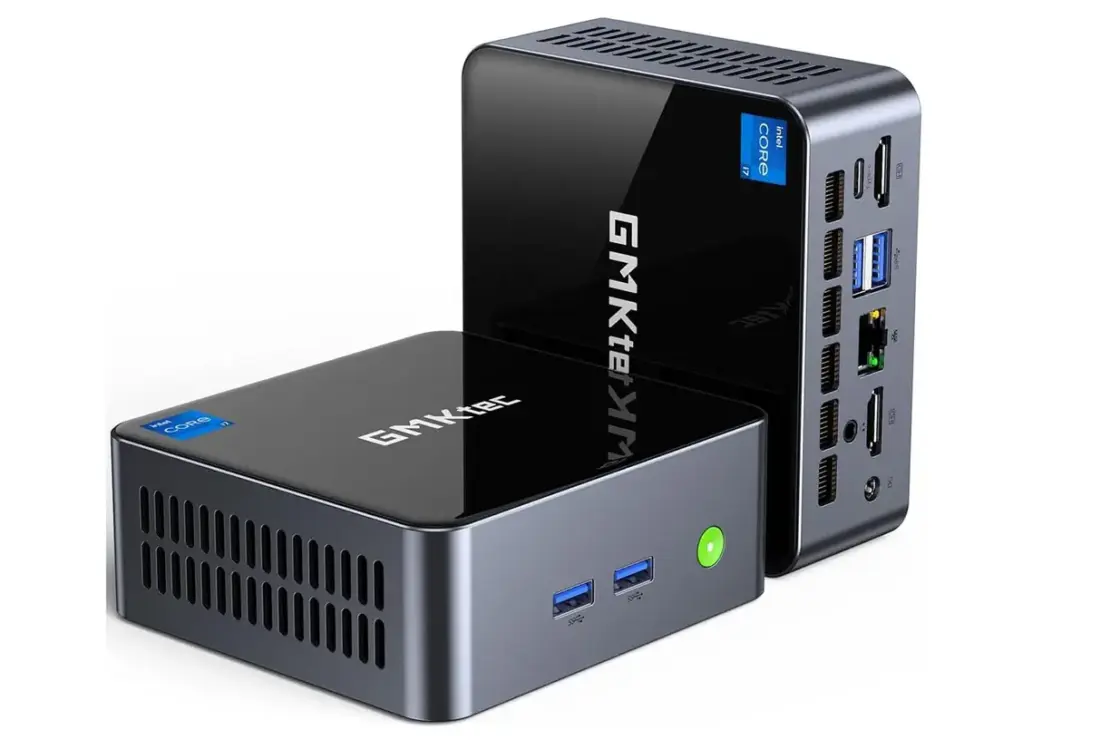
Tech fans know Apple gets love for compact machines, yet many need Windows power in a small box. Developers with Windows-only tools, small shops managing Microsoft gear, and creators who use Adobe suites all want real performance without a bulky tower. The GMKtec M2 Pro S answers this call with a proper desktop feel inside a compact shell. It packs an Intel Core i7-1185G7, 32GB of RAM, and room for three 4K screens, all in a case that’s book-sized. Right now, you can grab it for 409 dollars, down from 639, making a strong case for power on a tight desk.
Solid Tiger Lake Muscle in a Mini PC
GMKtec retools Intel’s Tiger Lake mobile line for a desktop-like mini PC. The Core i7-1185G7 is a four-core chip that peaks fast on demanding tasks. It starts at 3.0 GHz and can hit 4.8 GHz on single-thread work, with four cores running at about 4.3 GHz when fully loaded. That speed matters for quick app reactions, fast video edits, and smooth multitasking. With eight threads, the CPU can juggle several jobs without slowing down.
Graphics Power That Teaches Your Eyes to Relax
The unit uses Intel Iris Xe Graphics with 96 execution units. This isn’t a stripped-back GPU; it outclasses older integrated graphics and even some budget discrete cards. Expect smoother screen motion, better video encoding, and the ability to run design apps without a separate GPU. It’s a big step for a tiny PC.
Memory and Storage Keep Everything Moving
The M2 Pro S ships with 32GB of dual‑channel DDR4 RAM, right from the factory. Dual-channel RAM boosts data flow between the CPU and memory, cutting slowdowns in busy tasks. A 1TB NVMe SSD follows the PCIe 3.0 standard, delivering read speeds around 3,500 MB/s. That makes the system feel responsive, especially compared with older SATA drives.
Three 4K Displays, One Clear Setup
This mini PC shines in display work. It supports three 4K screens at 60Hz total. Two HDMI 2.0 ports carry 4K at 60 Hz each. The third monitor connects via USB-C with DisplayPort alt mode, also at 4K60. You can spread a workflow across screens for markets, code, and testing, or edit while keeping assets nearby. The 60 Hz refresh rate keeps motion smooth and the cursor responsive.

Who Gains Most from This Tiny Power Plant
Creators who edit video or photos will like fast timelines and quick renders. Developers can keep code on one display while docs and tests run on the others. Small businesses can run a Windows ecosystem without a big PC footprint. The M2 Pro S puts desktop-class muscle into a compact box, ideal for desks with limited space.

Value That Makes Sense Right Now
With a price drop to 409 dollars, this mini PC sits well below many full-size desktops. It delivers strong CPU power, capable graphics, abundant RAM, and ample fast storage. For anyone who wants Windows-native power in a small package, it’s a compelling choice.
Real-World Impressions
Users report snappy system responses, smooth multitasking, and robust display options. The combination of a fast CPU, plentiful RAM, and quick NVMe storage helps daily tasks feel instinctive. The three-monitor setup is a real productivity booster for multi‑screen workflows or complex projects. In short, this mini PC drinks deeply from desktop-grade power, yet remains compact enough for easy placement.
What to Consider Before You Buy
If you rely on older software that isn’t optimized for modern CPUs, check compatibility first. The unit’s strength lies in multitasking and media work, not heavy gaming. For those who want a quiet, compact PC with real Windows performance, the M2 Pro S delivers solid value.
Please note that when you make a purchase through our links at GameHaunt, we might earn a small commission. This helps us keep bringing you the free journalism you love on our site! And don’t worry, our editorial content remains totally unbiased. If you’d like to show some support, you can do so here.

