
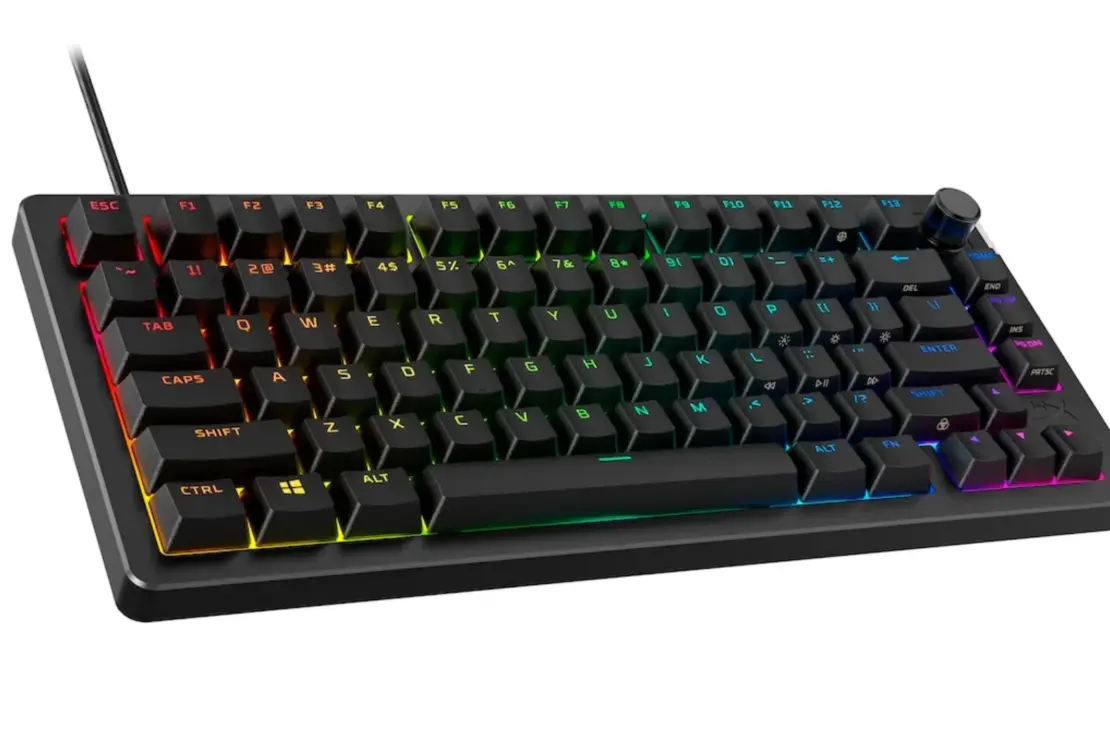

The HyperX Alloy Rise 75 Wireless represents HyperX’s ambitious attempt to bridge the gap between custom mechanical keyboards and mainstream gaming peripherals. This tenkeyless 75%-style keyboard offers dual wireless connectivity via Bluetooth or 2.4GHz, hot-swappable mechanical switches, and a magnetic top plate system that invites personalization. At $277 AUD ($179 USD), the Alloy Rise 75 Wireless Gaming Keyboard faces stiff competition from hall-effect alternatives and budget-friendly custom options. This gaming keyboard review explores whether HyperX’s latest offering can justify its premium price tag in 2025’s crowded keyboard market.
What Makes the HyperX Alloy Rise 75 Wireless Stand Out?
The Alloy Rise 75 Wireless keyboard immediately catches your eye with its swappable customization options. HyperX built this mechanical gaming keyboard around a modular philosophy, featuring a magnetic top plate that lifts off to reveal different aesthetic possibilities. You can purchase additional face plates in black, white, or navy, each bundled with a matching volume knob to complete the look.
Beyond the cosmetic touches, this wireless gaming keyboard packs practical features that matter during extended sessions. The ambient light sensor automatically adjusts RGB brightness based on your room lighting, eliminating the need to manually toggle between modes when conserving battery life. A physical toggle on the keyboard’s top right corner lets you switch between off, Bluetooth, or 2.4GHz modes without diving into software menus.
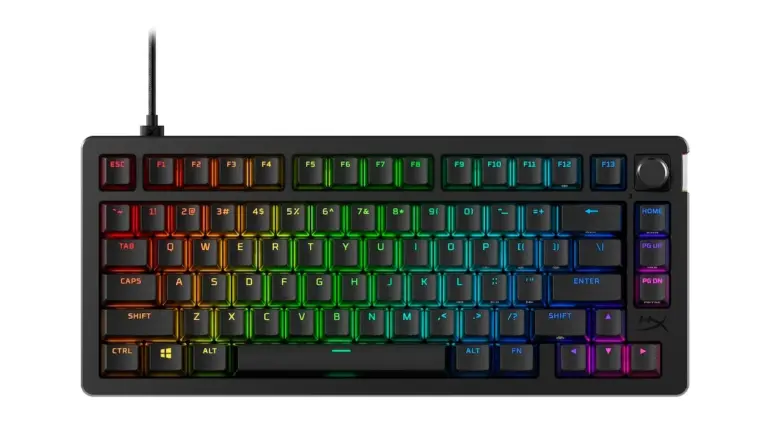
The rotary knob handles volume control and mute functions out of the box, though you can reprogram it through the NGenuity software. HyperX positioned the FN key to access secondary keyboard functions like media controls and backlight brightness, with helpful symbols printed on the side of the keycaps to guide you.
How Does the Alloy Rise 75 Wireless Keyboard Build Quality Hold Up?
Build quality presents a mixed picture for this wireless keyboard. The chassis relies predominantly on plastic construction, with only the removable top plate and decorative badge offering metal elements. At just under a kilogram, the Rise 75 Wireless gaming keyboard feels lighter than you might expect for its price point. Modern full aluminum keyboards regularly undercut the Alloy Rise 75 at half this asking price.
The plastic body does creak noticeably when flexed, which undermines confidence in the keyboard’s premium positioning. However, those who frequently transport their keyboard will appreciate the reduced weight for travel. HyperX kept branding subtle, placing their logo on the top plate with additional markings underneath where they remain out of sight during normal use.
The removable metal badge on the side of the keyboard adds another layer of customization potential. HyperX sells badge packs separately at $25 USD, allowing you to swap out the default design for something more personal. The magnetic top plate detaches easily for cleaning or replacement, though the thin metal construction feels somewhat flimsy compared to the premium keyboards this pricing suggests.
What Switch Options Does the HyperX Alloy Rise 75 Mechanical Keyboard Offer?
HyperX equips the Alloy Rise 75 with their own proprietary red switches, specifically HyperX linear switches with a 1.8mm actuation point. These pre-lubed linear switches deliver smooth keypresses without the tactile bump or audible click some typists prefer. The switches come rated for 80 million keypresses, promising years of reliable gaming performance before any degradation.
The hot-swappable design means you can easily remove these red mechanical switches and install alternatives without soldering. A keycap and switch puller ships in the box to facilitate this process. This flexibility appeals to enthusiasts who want to experiment with different switch types or replace worn components down the line.
I found the HyperX linear switches lighter and shorter in travel than my daily drivers. Gamers will likely appreciate the reduced actuation distance for faster inputs during competitive play. The switches produce a higher-pitched sound profile compared to community favorites like Oil Kings, but they remain impressively smooth throughout their travel. RGB lighting shines through the switch housing clearly, maximizing the visual impact of your chosen backlight settings.
Is the Battery Life on the Alloy Rise 75 Wireless Good Enough?
HyperX claims up to 80 hours of battery life with the RGB lighting disabled, extending to a staggering 1500 hours in backlight-off mode. These figures position the Alloy Rise 75 Wireless keyboard competitively against other wireless mechanical keyboards on the market. Real-world usage with moderate RGB brightness will naturally fall somewhere between these extremes.
The ambient light sensor deserves credit for helping maximize battery life without sacrificing visual appeal. By automatically dimming the backlight in well-lit rooms and boosting brightness in darker environments, the keyboard intelligently manages power consumption based on your actual needs. You can also connect via USB for wired keyboard operation, which simultaneously charges the internal battery.
Using the keyboard in 2.4GHz wireless mode consumes slightly more power than Bluetooth, though both options performed admirably during my testing period. The USB-C charging cable included in the box doubles as a wired connection for latency-sensitive gaming situations or when you forget to charge overnight.
How Does the RGB Lighting and Customization Compare?
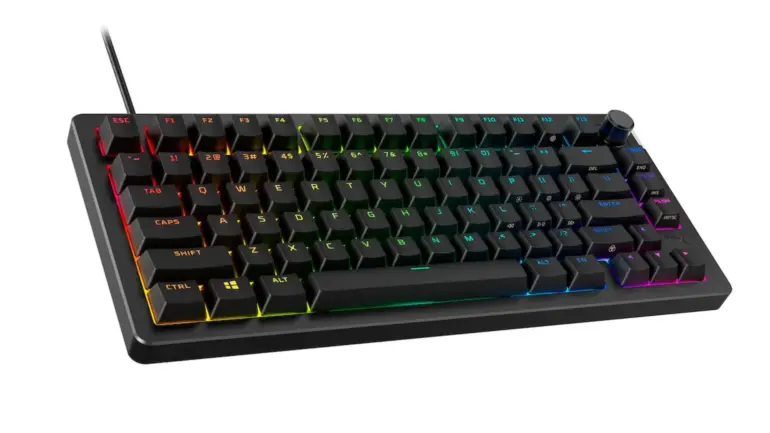
The Alloy Rise 75 delivers RGB lighting on both sides of the case, creating an evenly diffused ambient glow that breaks up the otherwise standard black aesthetic. This side lighting adds visual interest without overwhelming your desk setup. Per-key RGB customization lets you create specific lighting zones or apply dynamic effects across the entire keyboard.
Brightness levels won’t blind you in a dark room, which some users will consider a positive. The backlight remains dimmable through multiple levels via the FN key shortcuts or through the HyperX NGenuity software. Unfortunately, the RGB shinethrough on the keycaps proves inconsistent. The Windows key, J, C, and B keys suffer from uneven backlight distribution that becomes noticeable once you spot it.
Customization options extend beyond lighting through the NGenuity software, available from HyperX’s website or the Windows Microsoft Store. You can program macros, reassign keyboard shortcuts, and adjust lighting effects. The software maintains a light footprint and won’t hog system resources in the background. Notably, you can also configure basic lighting settings directly through Windows without installing additional software, a feature I genuinely appreciate.
What’s the Gaming Performance Like on the HyperX Alloy Rise 75?
Gaming performance on the Rise 75 Wireless gaming keyboard proves adequate for casual and semi-competitive play. The mechanical switches respond quickly enough for everyday gaming sessions, and HyperX includes a gaming mode that disables the Windows key to prevent accidental desktop interruptions during intense moments.
During my testing across various game genres, I noticed no perceptible latency difference between Bluetooth, 2.4GHz, or wired connections for non-competitive gaming. The wireless model performs reliably without the dropouts or interference that plagued earlier generations of wireless keyboards. Polling rate options let you balance responsiveness against battery consumption based on your priorities.
However, and this represents a significant disappointment, the keyboard isn’t equipped with hall-effect switches. In 2025, this omission feels like a smartphone shipping with micro USB charging. Hall-effect technology and rapid trigger capabilities have become essential features for competitive gaming, offering advantages that traditional mechanical switches simply cannot match. For serious competitive gamers, this limitation makes the Alloy Rise 75 a tough recommendation regardless of its other merits.
How Does the Typing Experience Feel on This Mechanical Keyboard?
The overall typing experience lands somewhere in the average range for keyboards at this price point. While the gasket-mounted design provides a softer, bouncier feel compared to rigid tray-mount alternatives, the primarily plastic construction produces a rather hollow sound signature lacking in body. The stabilizers ship unevenly lubed, which contributes to inconsistent acoustics on larger keys.
Opening up the keyboard reveals thin layers of plate and case foam, PCB-mounted stabilizers with visible lubrication, and a non-flex cut plastic plate. The gasket mounting uses stiffer rubber gaskets that don’t allow much give, limiting the cushioned typing feel this design typically provides. Interestingly, HyperX screwed the plate directly onto the PCB and glued the case foam to the bottom housing.


The keycaps feature a scratchy, rough texture designed to improve grip during gaming. While functional, this finish looks and feels somewhat tacky compared to smoother PBT alternatives. HyperX retained their gaming-focused font styling, which remains polarizing among keyboard enthusiasts. The texture combined with the font creates an unmistakably “gamer” aesthetic that won’t appeal to everyone seeking a premium typing tool.
What Keyboard Features and Shortcuts Does the Alloy Rise 75 Include?
HyperX programmed extensive secondary keyboard functions accessible through the FN key layer. Media controls, RGB brightness adjustments, and quick toggles come pre-mapped to logical key positions. Symbols printed on the side of select keycaps help you learn these shortcuts without constant reference to documentation.
The volume knob on the top right provides intuitive audio control, with a press-to-mute function that eliminates reaching for software controls. You can reprogram this knob through NGenuity software if you prefer different functionality. Single-stage risers on the bottom offer two typing angles, though some competitors provide three-position adjustment for more ergonomic flexibility.
A clever nook on the keyboard’s underside stores the 2.4GHz wireless receiver when traveling. Strong magnets keep the receiver secured during transport, preventing loss while maintaining easy access when you reach your destination. This thoughtful design touch reflects the attention HyperX paid to the keyboard’s usability beyond just gaming.
How Does the HyperX Alloy Rise 75 Compare to Other Keyboards on the Market?
The Alloy Rise 75 occupies an awkward middle ground in today’s keyboard market. Custom mechanical keyboards with full aluminum construction, superior sound profiles, and hot-swap capabilities regularly sell for half this price from brands like Keychron, QMK-compatible options, and group buy offerings. Meanwhile, dedicated gaming keyboards from competitors increasingly feature hall-effect switches at similar or lower price points.
If you value the aesthetic customization through swappable plates and badges, the Alloy Rise 75 offers something genuinely unique among mainstream gaming keyboards. The combination of RGB side lighting, ambient light sensor, and modular design elements creates personalization options few competitors match. HyperX clearly aimed to upgrade your gaming setup with visual flexibility alongside functional performance.
For pure gaming performance, alternatives like the Wooting 60HE or Razer Huntsman V3 Pro deliver the hall-effect advantages serious competitors require. For typing quality and build construction, enthusiast options simply outclass the Rise 75 at lower prices. The HyperX Alloy Rise 75 wireless keyboard works best for gamers who prioritize wireless convenience, appreciate the swappable aesthetic options, and don’t require cutting-edge competitive features.
Is the HyperX Alloy Rise 75 Wireless Worth Buying in 2025?
The amazing keyboard HyperX clearly envisioned doesn’t quite materialize in the final product. While the Alloy Rise 75 mechanical keyboard brings genuine innovation through its modular plate system, ambient light sensor, and dual wireless connectivity, it stumbles on fundamentals that matter most to its target audience. The absence of hall-effect switches represents a critical oversight for any gaming keyboard at this price point in 2025.
Casual gamers who want a reliable wireless mechanical keyboard with personality will find the Rise 75 serviceable. The 80 hours of battery life, hot-swappable switches, and customizable aesthetics create real value for users whose priorities align with these strengths. Build quality and typing feel, while not exceptional, remain perfectly functional for everyday use.
GameHaunt Score: 3.0/5
The HyperX Alloy Rise 75 Wireless delivers a competent wireless gaming keyboard that prioritizes customization over competitive performance. Had HyperX included hall-effect switches and sharpened the pricing, this would be among the best options on the market for enthusiast gamers. In its current form, it serves a narrow audience of casual gamers who value aesthetic flexibility above all else.
Key Takeaways: HyperX Alloy Rise 75 Wireless Keyboard Review
- Wireless Performance: Dual connectivity via Bluetooth or 2.4GHz with up to 80 hours of battery life (RGB on) or 1500 hours with backlight disabled
- Hot-Swappable Design: The keyboard features hot-swap capability for switch customization without soldering, using pre-lubed HyperX linear red switches with 1.8mm actuation
- Modular Aesthetics: Magnetic top plate and removable badge system allow visual customization, with additional plates available separately
- RGB Lighting: Per-key RGB with ambient light sensor for automatic brightness adjustment based on room lighting conditions
- Build Concerns: Predominantly plastic construction with noticeable flex, lighter weight than premium pricing suggests
- Missing Feature: No hall-effect switches limits competitive gaming appeal in 2025’s market
- Software: NGenuity software handles customization options with minimal system resource usage
- Best For: Casual gamers prioritizing wireless convenience and aesthetic customization over competitive performance
- Skip If: You need hall-effect rapid trigger for competitive gaming or want premium build quality at this price point

