


Remember the scramble. You had Hero Wars open in one tab, a boss guide in another, a Reddit thread somewhere else, and a YouTube tutorial paused in the background. You lost time switching, missed attack windows, and sometimes lost the run entirely. That chaotic tab dance cost you progress and patience.
In 2025, AI-powered browsers turn that juggling act into a single, intelligent flow. Browsers like Comet shift from passive window to active co-pilot, bringing strategy tips, review summaries, and personalized game discovery directly to your screen, without ever pulling you out of the action.
What makes an AI browser “agentic”
An agentic browser does more than render pages or run a chatbot in the corner. It understands context, plans multi-step actions, learns your habits, and proactively surfaces what you need before you ask.
- Understands context: Recognizes the game on screen, the encounter you face, and your recent actions
- Performs multi-step tasks: Searches forums, compares opinions, and presents concise summaries without manual prompts
- Learns and adapts: Tracks your genre preferences, playstyle, and past decisions to refine future suggestions
- Proactively assists: Surfaces counters, upgrade paths, or mechanics explanations at the right moment
This is not autocomplete for search bars. This is a browser that grasps intent, executes research autonomously, and delivers results in a format that keeps you in the game.
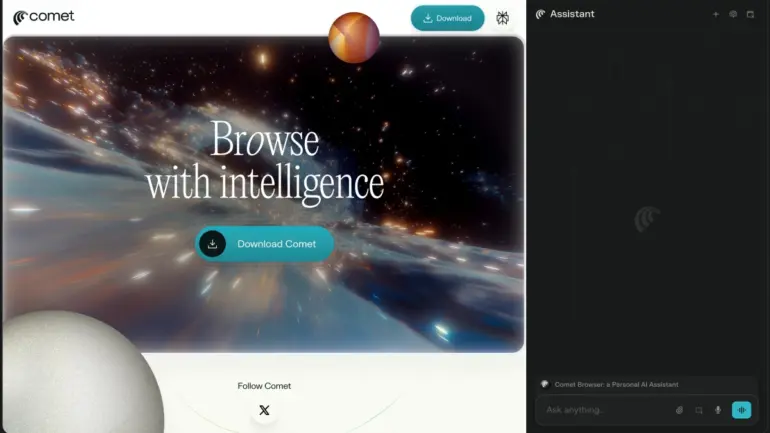
Comet as your browser game co-pilot
Take Hero Wars, a popular browser RPG with complex hero synergies, artifact trees, and progression bottlenecks. Traditionally, mastering Hero Wars meant pausing, researching, and returning with half-remembered advice. Comet changes that loop entirely.
Real-time strategy research
You hit a tough boss in Hero Wars. Comet recognizes the encounter by analyzing on-screen elements and can automatically pull optimal strategies, team compositions, and counter-hero suggestions for that specific boss. It presents this information in a concise sidebar or overlay, letting you adjust your lineup without leaving the game window.
- Surfaces enemy weaknesses and recommended tactics for new enemy types
- Analyzes your current resources and suggests efficient upgrade paths based on community meta-strategies
- Highlights mechanics you have not used yet, with short, readable prompts
The difference is timing. You get the answer when you need it, not after tabbing out and losing your place.
Intelligent player review comparison
Before you invest hard-earned resources in a new hero or legendary artifact, you want consensus. Manually sifting through forums, wikis, and Reddit threads takes time and often yields contradictory advice.
Comet scans multiple reputable gaming forums, fan wikis, and community platforms to gather and synthesize player reviews and opinions on specific heroes, artifacts, or game mechanics. It provides a comprehensive overview, highlighting common pros and cons, and flags outlier opinions that might be overly enthusiastic or disgruntled.
This aggregated sentiment view helps you make informed decisions without drowning in noise. You see the consensus, the caveats, and the edge cases, all in one concise summary.
Discovering your next obsession
You’ve conquered Hero Wars (for now) and want a new browser game. Generic top-ten lists rarely match your specific tastes, and scrolling endless directories feels like work.
Based on your playing history (games you’ve enjoyed, genres you favor, even in-game preferences), Comet can proactively suggest new browser games that align with your interests. It goes beyond simple genre matching. It identifies games with similar mechanics, art styles, progression curves, or community vibes.
- “If you like X, you’ll love Y” engine: Analyzes attributes of your favorite games and scours the web for similar titles, complete with trailers, gameplay snippets, and aggregated review scores
- Trending game alerts: Notifies you of new, highly-rated, or trending browser games that fit your profile
- Personalized filters: Learns which mechanics you avoid (pay-to-win, energy systems, slow progression) and excludes those from recommendations
You spend less time searching and more time playing games you actually enjoy.
Comet vs. Opera GX: environment vs. experience
Opera GX has long been the go-to gaming browser, celebrated for its resource management, network limiters, and integrations with Twitch, Discord, and other services. It optimizes the environment around your game. Comet takes the next step by optimizing the gameplay experience itself through intelligent assistance.
Opera GX strengths
- RAM/CPU Limiter: Prevents the browser from hogging system resources
- Network Limiter: Controls bandwidth usage for smoother gaming
- Built-in VPN: Adds privacy and bypasses regional restrictions
- Integrated Twitch, Discord, Facebook Messenger: Keeps communication in one place
- Customizable themes and sound effects: Personalizes the browser aesthetic
- GX Corner: Aggregates gaming news and deals
Opera GX gives you a high-performance rig for your browser. It keeps your system responsive and your streams accessible. For more details, visit the Opera GX official site.
Comet’s agentic advantage
- Proactive strategy assistance: Directly helps with in-game decisions by surfacing counters and builds
- Automated research: Gathers information on demand, saving time and mental load
- Intelligent discovery: Learns your preferences for personalized game recommendations
- Contextual understanding: Interacts with the game content itself, not just the browser shell
If Opera GX is the gaming PC, Comet is the AI co-pilot sitting next to you, calling out opportunities and risks in real time. Both matter. You can pair a resource-optimized environment with an agentic assistant to get the best of both worlds.
Practical applications: Hero Wars walkthrough
To make this concrete, here’s how Comet works in a typical Hero Wars session.
Encounter analysis
You face a new boss with unfamiliar mechanics. Comet recognizes the boss name or visual cues and searches community guides, patch notes, and forum posts for that specific encounter. It surfaces a summary in the sidebar:
- Boss abilities and phases
- Recommended hero counters (with your current roster highlighted)
- Common mistakes and how to avoid them

You adjust your team composition on the fly, without pausing or tabbing out.
Resource allocation guidance
You have gold to spend and multiple upgrade paths. Comet analyzes your current progress, compares it to community benchmarks, and recommends the upgrade with the highest return for your next milestone. It shows you the math: cost, stat gains, and impact on your next boss clear.
You make an informed decision in seconds, not minutes.
Review aggregation for purchases
A new artifact appears in the shop. Before you buy, Comet pulls player sentiment from multiple sources: forums, Reddit, Discord leaks, and wiki notes. It shows you:
- Average community rating (e.g., 4.2/5 from 150+ reviews)
- Most common pros (synergy with X hero, strong in Y scenario)
- Most common cons (weak against Z team, expensive to upgrade)
- Outlier opinions flagged (e.g., “One user loves it for niche strategy, but most disagree”)
You know exactly what you’re buying and whether it fits your playstyle.
Game discovery
You finish the campaign and want something new. Comet suggests three browser games based on your Hero Wars history:


- A tactical RPG with similar hero-collection mechanics
- A strategy game with comparable progression systems
- An action RPG with the same art style and community size
Each suggestion includes a trailer, aggregated review score, and a one-sentence pitch. You click, play, and find your next favorite in minutes.
Privacy, fairness, and guardrails
Power without safeguards creates problems. Agentic browsers must respect rules, your data, and game-specific terms of service.
Fair play and terms of service
- Do not automate inputs in games that prohibit it
- Keep assistance in the realm of coaching, not scripted action
- Honor game-specific rules for overlays and third-party tools
- Disclose when actions cross into automation territory
Privacy and data handling
- Keep sensitive inputs local whenever possible
- Offer clear controls for what data leaves your device
- Provide an obvious kill switch for AI features
- Store browsing history and preferences encrypted and segmented
Accuracy and transparency
- Cite sources when summarizing community strategies (e.g., “From 15 forum posts on Hero Wars subreddit”)
- Show confidence levels for recommendations (e.g., “High confidence: 80% of reviews agree”)
- Let you drill down to raw posts or wikis when you want detail
- Flag outdated information (e.g., “Guide from patch 1.2, current patch is 1.5”)
You should trust the assistant, but you should also verify when stakes are high.
The 2025 outlook
AI browsers compress the gap between intent and action. They do not replace skill or decision-making. They amplify both. Expect tighter loops between encountering a new mechanic and understanding it, faster onboarding for complex systems, and a steadier pipeline of games that match your taste without endless list scrolling.
You will still make the call when it matters. You will simply spend less time searching, more time playing, and more time improving at the games you love.
Browser games have always been accessible, but they have rarely been smart. In 2025, that changes. The future is not just better graphics or deeper mechanics. It’s an intelligent companion that knows what you need, surfaces it when you need it, and gets out of your way when you do not.
How do AI browsers help during a boss fight?
They surface counters, mechanics, and build suggestions that match the enemy on screen, presented in a sidebar or overlay so you never leave the game window.
Is this allowed in competitive games?
Follow each game’s terms of service. Use coaching and research assistance, not automated inputs or scripted actions. Most games allow overlays that do not interact with the game client.
Does this add input lag or performance overhead?
Overlays and sidebars have minimal impact on modern systems. Heavy analysis runs off the main thread or on remote servers to keep gameplay smooth. Resource-limited systems can disable features selectively.
What about privacy and data collection?
Keep sensitive inputs local. Use clear toggles for any cloud processing. Choose browsers that offer data segmentation, encryption, and opt-out controls for AI features.
Can I use this on older hardware or slower connections?
Yes, with lighter models and static prompts. Disable real-time analysis and use on-demand research instead. Pair with resource limiters (like those in Opera GX) for optimal performance.
How do I avoid bad advice or outdated strategies?
Prefer summarized guidance with sources and confidence levels. Open raw posts when advice looks uncertain. Flag outdated patches in your browser settings so the assistant can filter old information.

