

A Gentle Hobby: Mech Builder 3D Ships on Steam
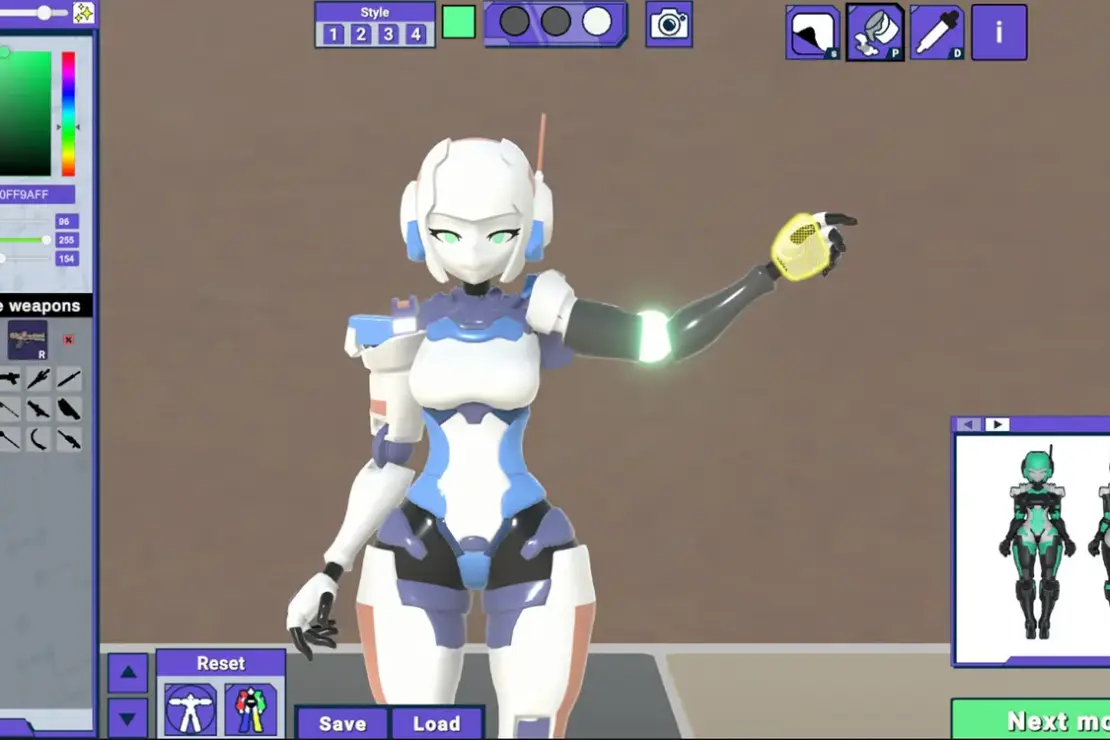
Don Pachi brings Mech Builder 3D to PC, turning plastic kit work into a quiet game. It draws from Gunpla vibes, aiming for a soothing escape from pricey, messy model shops. On launch, the game includes 61 model kits, spanning classic mechs to bold kaiju-inspired frames. Players can tackle assembly, painting, and decals with tools that feel smooth and forgiving, so small parts don’t vanish or brushes go astray.
What You Get: 61 Kits and a Wide Range of Styles
From die-hard robot fans to casual hobbyists, there’s a model for many tastes. The kits vary in size and silhouette, giving you a mix of proportions to explore. Each model supports the full build flow: put pieces together, color them, and add decals. The aim is a stress-free process that mimics the feel of real-world model work without the mess. The early content promises a satisfying pace, letting players finish several builds if they want a quick run.
Kitbashing and Customization: Break from the Script
A standout feature is kitbash, which invites you to mix parts from different kits. This lets you craft one-of-a-kind machines, not mere copies of the box art. The options don’t stop at assembly; the painting booth and decal tools offer broad control over color schemes and markings. The developer notes that finishing all standard kits typically takes about 7 to 9 hours, depending on your pace. Yet the kitbash mode adds near limitless room for experimentation, keeping things fresh after multiple plays.
Poses and Dioramas: Presenting Your Creations
When a kit is done, the game shifts to display. A dedicated posing system lets you bend joints and set up action-ready stances for photos. If you want a scene to tell a story, diorama mode provides backgrounds and decor pieces to place around your model. These tools recreate the photography side of the hobby in a digital space, making it easy to snap clear, shareable shots of your builds. The result is a platform where your work can shine without leaving your screen.
Aesthetic, Tools, and the Feel of the Hobby
Visually, Mech Builder 3D leans into clean lines and bright paint palettes. The interface stays simple, guiding you from first snap to final decal without fuss. Sound design emphasizes a calm, steady rhythm that suits long, soothing sessions. The tuning of controls is meant to be friendly for newcomers, yet deep enough for fans who want precise color and part placement. The overall vibe mirrors the calm planning phase of a real build, not a race to finish.
Who It Appeals To and Why It Works on PC
This title sits well for Gunpla fans and curious players alike. It serves as a gentle gateway into the world of model kit building and customization. The kitbash system invites creative risk without sticking you to a strict plan, which is perfect for those who enjoy tinkering. For PC gamers, the Steam platform makes updates and sharing a breeze, helping the community grow around photos, tips, and show-and-tell builds. The game also fits well into the broader niche of indie simulation titles that focus on craft and patience.

Why Mech Builder 3D Stands Out
The core idea is simple yet effective: give players a safe space to assemble and customize with real-world charm. By combining standard build steps with a generous kitbash sandbox, it scratches two itches at once. Those who love the Gunpla aesthetic will find more depth here than a quick, one-note sim. The diorama and posing modes let you frame your work as if you were in a tiny studio, making it easy to share crisp, vibrant images.


Steam as the Right Home for This Experience
The game is designed for PC players who want a relaxed, creative playground. Steam provides easy access to the 61 kit lineup, plus new kits or tools as updates roll out. The cooperative spirit of the kitbash and diorama modes grows as players post their builds, exchange ideas, and inspire each other. It’s a hobby game with room to grow, not a high-stress sprint.
Ready for a Quiet Build Adventure?
If you crave a cozy, hands-on project with plenty of color and character, Mech Builder 3D could be your next go-to. It blends the calm pace of model work with the convenience of digital tools. The mix of standard builds and free-form kitbash offers both structure and freedom, perfect for evenings when you want to unwind with something tactile yet virtual.
Find It on Steam
Steam listing: https://store.steampowered.com/app/3667150/Mech_Builder_3D/
Tags: diorama mode, Don Pachi, gunpla, Gunpla simulator, Indie Games, kitbash, Mech Builder 3D, model kit assembly, model kit building, PC Games, Steam
Please note that when you make a purchase through our links at GameHaunt, we might earn a small commission. This helps us keep bringing you the free journalism you love on our site! And don’t worry, our editorial content remains totally unbiased. If you’d like to show some support, you can do so here.

