
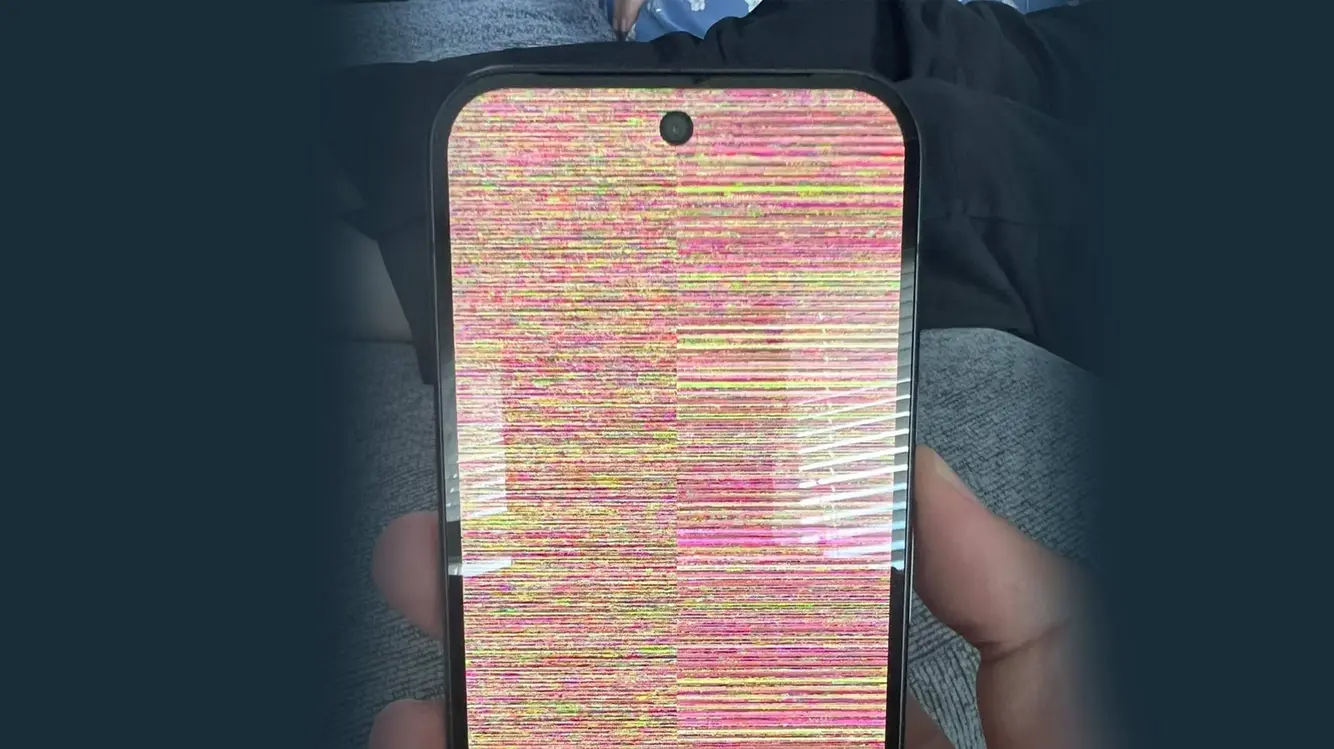

Pixel 10 Snow Glitch Sparks a Quick Fix Talk
Last week, Pixel 10 owners spotted a strange screen issue that looked like random snow drifting across the display. Google has now confirmed to Android Authority that a remedy is in the works. The bug appears to hit only the Pixel 10 line, with no reports tied to the Pixel 10 Pro so far.
A Reddit thread helped push the buzz, with users sharing videos and screenshots of the frozen look. The problem seems fleeting, then returns to normal, which makes it hard for many to tell if the device is acting up or if it’s a rare glitch. Google’s team is on it, this time with a fix in the works rather than a full-scale recall.
What Google says about the fix
Google confirmed the fix to Android Authority, indicating engineers have located the issue and are rolling out a patch. The company did not label the snow effect as a separate bug, but insiders say the update targets the same problem. An official comment from Google stressed that the focus is on stabilizing the screen during tricky moments, not just a casual blur or minor lag.
The update has begun its broad rollout since September 3. For most Pixel 10 users, the patch should arrive by now if their device checks in with the latest firmware. The changelog tied to this release does not explicitly mention snow, but it does cite a fix for a black screen that happens when moving from a web page to another part of an app’s in-app browser under certain conditions. Many see this as the same bug in disguise.
What the update changes
In plain terms, this patch should reduce moments when the screen goes dark or freezes at key transition points. If you’ve ever seen the screen go black as you switch from a webpage to another app page, you know how jarring it can be. The update aims to smooth those transitions and keep the display steady during quick moves inside apps.
While the changelog is tight, users who had the snow issue report a calmer, more predictable screen after installing the patch. There’s no guarantee this will erase every rare case, but it should cut the odds of another sudden white or static screen during daily use. In practice, the fix should help in real life tasks like reading an article, swapping tabs, or opening a new app pane.
How to tell if you got the patch
If you own a Pixel 10, head to Settings > System > System update to check for the latest build. Users who have received the update say the phone shows a normal reboot or steady operation after install. Those who still see the snow or a blackout should report it to Google or their carrier as a verification step.
A quick note: not every unit will show the issue the same way. Some phones might render a quick flash of static before normal use, while others may not notice a thing. It is a good idea to keep the phone charged and connected to Wi-Fi to speed up the patch’s arrival if you’re in a slow area.
Why some Pixel 10 models see it, but not others
It seems a mix of software timing and device behavior can trip the bug. A few Pixel 10 devices hit the problem during web-to-app transitions, while Pixel 10 Pro units may not show the same issue. Software patches can land unevenly based on carrier firmware and regional builds, so patience often helps.
The pattern reported by users points to the problem resurfacing mainly in specific in-app browser flows and page transitions rather than a constant display fault. That’s why the fix lands through a routine system update, not a special app patch.
What users should do next
If you’ve had the snow issue, installing the latest update is the best first move. After upgrading, test essential tasks: open a link in an in-app browser, switch between tabs, and move to other apps. If the screen stays steady, you’re likely on the latest fix. If trouble returns, share details with Google’s support forums or your carrier’s help desk.
For those who haven’t seen the bug, it’s still wise to keep the device current. The patch not only tackles the snow effect but adds other small reliability tweaks that make day-to-day use smoother.


Keeping the Pixel 10 experience strong
The Pixel lineup has seen occasional hiccups, but Google generally sends fixes quickly when issues surface. The snow glitch appears as a rare, localized problem rather than a systemic failure. As long as updates land on time, most users can expect a stable screen through the usual apps and tasks.
Technology moves fast, and even small fixes matter. A clean transition from page to page keeps browsing and gaming sessions friction-free. For some, the patch might feel invisible, yet it changes the moment-to-moment feel of using the phone.
Readers’ voices often steer the conversation here. If your device has the patch now, tell us how the screen behaved before and after the update. Real-world feedback helps others gauge when a phone is truly fixed. We’ll keep watching for more user reports and any extra patches Google may issue.
>
Please note that when you make a purchase through our links at GameHaunt, we might earn a small commission. This helps us keep bringing you the free journalism you love on our site! And don’t worry, our editorial content remains totally unbiased. If you’d like to show some support, you can do so here.

