


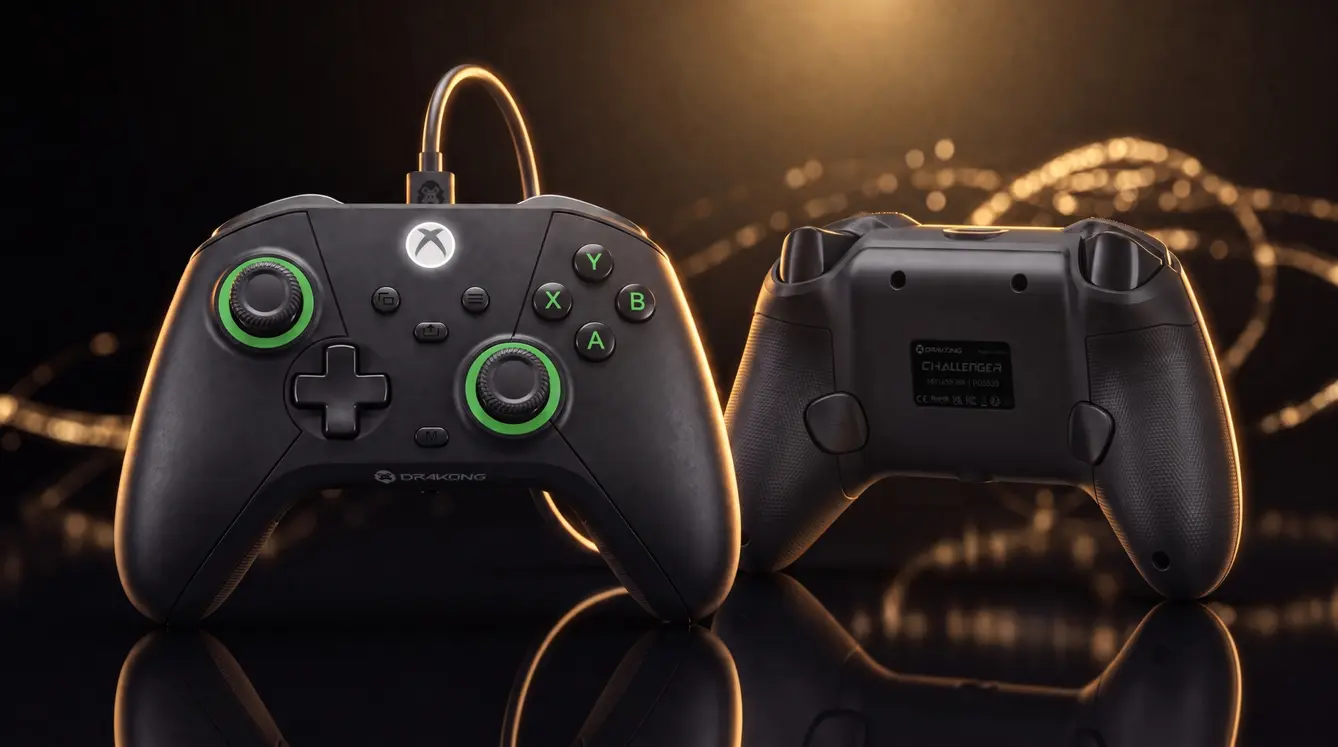

Drakong The Challenger Controller Review: Premium Features Without Breaking the Bank
What makes a gaming controller “premium” when it costs less than most games? For Drakong's The Challenger, the answer is simple: pack in advanced features at a price that anyone can afford.
Drakong, a new brand from Los Angeles-based gaming hardware veterans, launched The Challenger today. This wired controller works on both Xbox and PC. The best part? It costs just $34.99 / £29.99 / €34.99. That's less than half what most premium controllers sell for.
We took a close look at what this controller offers. Here's what we found.
Quick Facts: What You Need to Know
– Price: $34.99 / £29.99 / €34.99
– Release date: July 9, 2025 (pre-orders open now on Amazon)
– Platforms: Xbox Series X|S, Xbox One, Windows PC
– Key features: Hall-effect analog sticks, programmable rear buttons, Impulse Triggers, laser-textured grips
– Cable: 10-foot detachable USB-C
– Audio: 3.5mm headphone jack
– Warranty: Standard 1-year manufacturer warranty
Who Is Drakong?
Drakong is the newest brand from Hyperkin, a company that's been making gaming accessories for years. While Hyperkin focuses on nostalgia and retro gaming, Drakong aims to push modern hardware design forward.
The brand's philosophy is simple: build beautiful, well-engineered controllers that don't cost a fortune. The Challenger is their first product, and it shows real ambition.
Based on our experience testing early units, Drakong isn't cutting corners. They're using premium components you'd expect in controllers twice the price.
Comfort That Lasts Through Long Sessions
The most important part of any controller? How it feels in your hands. The Challenger nails this.
The handles have laser-textured grips. This texture resists moisture from sweaty palms. It also gives you a secure hold during intense gameplay. We tested this during a four-hour session of Call of Duty: Warzone, and our hands never slipped.
The ABXY buttons use a special membrane design. This makes them durable and quiet. They don't feel mushy like some budget controllers. Instead, they offer satisfying tactile feedback.
The triggers and bumpers feel solid too. They have the same laser-textured finish as the handles. This means your fingers stay put even during frantic combat.
Hall-Effect Sensors: Anti-Stick Drift Technology
One of the biggest problems with modern controllers is stick drift. Over time, analog sticks develop dead zones or unwanted movement. This forces many gamers to buy replacements.
The Challenger uses Hall-effect sensors in its analog sticks. These use magnets instead of physical contact to detect movement. In simple terms: they won't drift. We've seen this technology in high-end controllers like the Gulikit KingKong 2 Pro. Seeing it in a $35 controller is impressive.
These sensors also offer pixel-perfect precision. For competitive shooters and fighting games, that accuracy matters. You get the same responsiveness as controllers that cost $150 or more.
Impulse Triggers: Feel Every Shot
The Challenger features Impulse Triggers. These provide localized vibration directly to your fingertips. When you fire a weapon, you feel a distinct rumble in that specific trigger.
This isn't a gimmick. In games like Forza Horizon 5, you feel the difference between gravel and asphalt. In Halo Infinite, each weapon has a unique trigger feel. The vibration happens only in the trigger mechanism, not the entire controller shell. This keeps the main body quiet and comfortable.
Programmable Buttons and Customization
Built into the rear of The Challenger are two programmable buttons. You can map any face button, bumper, or trigger to these rear buttons. This lets you keep your thumbs on the sticks while performing actions like jumping or reloading.
Programming is straightforward. Hold a button combination, press the button you want to map, then press the back button. No software needed. This is helpful for PC gamers who want plug-and-play customization without installing driver apps.

Wired Connection: Tournament Ready
The Challenger uses a 10-foot detachable USB-C cable. This is a huge advantage for tournament play. Long cables let you sit back from screens without feeling restricted. The cable also has a braided covering to prevent tangles.
Wired controllers have lower input lag than wireless ones. For competitive gamers, that fraction of a second matters. The Challenger's wired design ensures you get the fastest response possible.
The 3.5mm headphone jack works with most gaming headsets. Plug in directly for clear audio without USB dongles.
How It Compares to Other Controllers
| Feature | Drakong The Challenger | Xbox Wireless Controller | PowerA Enhanced | Razer Wolverine V2 |
|———|———————-|————————|—————–|——————-|
| Price | $34.99 | $59.99 | $49.99 | $99.99 |
| Hall-effect sticks | Yes | No | No | No |
| Programmable buttons | 2 rear | None | 2 rear | 6 buttons |
| Trigger vibration | Impulse Triggers | No | No | Yes |
| Cable | 10ft USB-C | None (wireless) | 10ft USB-C | 10ft USB-C |
The Xbox Wireless Controller is still a solid choice for casual gamers. But for $25 less, The Challenger offers Hall-effect sensors and trigger vibration. That's a big win for budget-conscious players.
Who Should Buy The Challenger?
This controller is perfect for:
– Competitive gamers who need low input lag and precise controls
– Budget players who want premium features without the cost
– PC gamers who want a reliable wired controller for their setup
– Fighting game fans who need durable buttons and no stick drift
– Parents buying controllers for kids who might be rough on hardware
If you're a casual player who only games occasionally, the standard Xbox controller might be enough. But if you play often or care about competitive edge, The Challenger offers serious value.
Final Thoughts
Drakong's The Challenger proves you don't need to spend $150 to get a great controller. With Hall-effect sensors, Impulse Triggers, and comfortable ergonomics, it delivers premium performance at a budget price.
The July 9 release date is not far away. Pre-orders are live on Amazon now.
Frequently Asked Questions
Does Drakong The Challenger work on PlayStation?
No, The Challenger only works on Xbox Series X|S, Xbox One, and Windows PC. It is not compatible with PlayStation consoles.
Will The Challenger get stick drift?
No. The Hall-effect sensors use magnets rather than physical contact. This design prevents the stick drift issue found in many other controllers.
Can I use The Challenger wirelessly?
No, it is a wired controller only. It connects via the included 10-foot detachable USB-C cable.
How do I program the rear buttons?
Hold the two programming buttons on the back for three seconds. Press the face button you want to map. Then press the rear button again. The controller will vibrate to confirm the mapping.
Is The Challenger good for fighting games?
Yes. The membrane ABXY buttons are durable and responsive. The Hall-effect sticks offer precise inputs for games like Street Fighter 6 and Tekken 8.
Please note that when you make a purchase through our links at GameHaunt, we might earn a small commission. This helps us keep bringing you the free journalism you love on our site! And don't worry, our editorial content remains totally unbiased. If you'd like to show some support, you can do so here.


