

A Playful DIY Cooling Trick for iPhone Fans
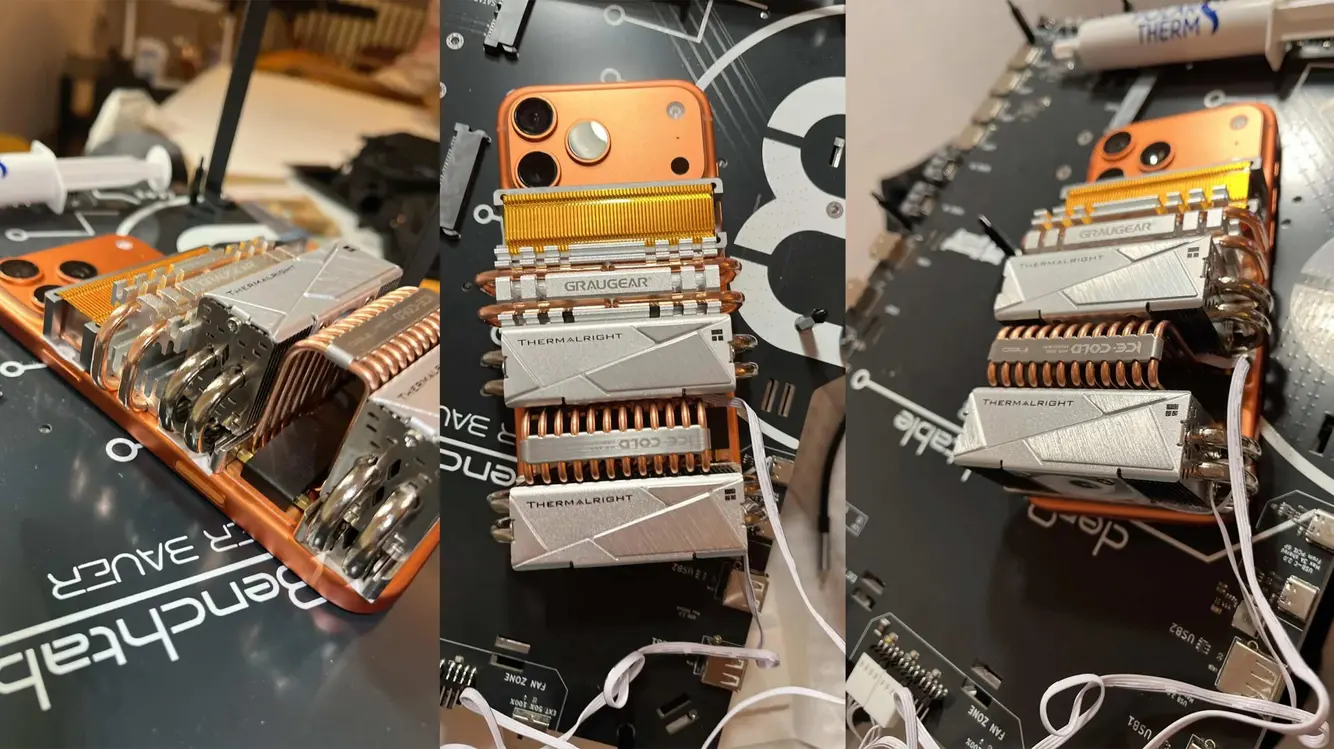
A Reddit post last week showed someone attaching many SSD heatsinks to an iPhone. For iPhone Fans, the goal was to push the phone’s sustained performance higher during long tasks. The idea is bold and oddly fun, especially on the Cosmic Orange iPhone model. Still, this approach is well beyond what most users need.
Why this setup feels overkill
The project relies on a stack of heatsinks plus two tiny fans that must draw power from motherboard headers. That means it isn’t a truly passive cooler. The hardware adds weight and bulk, which clashes with the phone’s design and its small camera form factor. The result is a cool idea in theory, but it risks making the device harder to hold and use.
What it means for real-world use
Even if the extra cooling helps during long shoots, the added heft undermines the phone’s light and handy vibe. The more you add, the more you question the point of using a compact camera in the first place. If a smaller, fan-free version existed, it might still help in hot conditions. But outdoors, in direct sun, even heated heatsinks can lose efficiency quickly.
Gamer notes: hot sun, long play sessions, and MagSafe gear
For gamers, cooling gear for iPhone is grabbing attention. MagSafe fan accessories are popular with players who roam outside to catch Pokémon Go or run long gaming sessions under sunlit skies. In bright weather, these fans promise to keep temps down and performance steady. Still, many of these add-ons are external clips, and their real benefit varies by environment.
What to consider if you’re thinking of a cooling add-on
If you want better Heat Management on the go, look for designs that stay lightweight. Passive cooling options, like slim vented cases, can help without adding noise or power needs. A clip-on fan can work, but it may need a powered source and create balance issues. In bright sun, screen brightness and heavy background tasks also play a role in heat buildup. A simple approach often works best: reduce load during peak heat, and look for gear that fits your comfort and grip.
Practical tips for outdoor gaming and filming
First, protect the phone from direct sun whenever possible. Shade or a small tent can dramatically lower surface temps. Second, turn off apps running in the background that drain power. Third, consider a stable, cool holding setup to avoid extra strain on the device. With these steps, you can extend playtime without piling on gadgets. For long shoots, plan pauses to cool the device and check temps.


Bottom line for cool-headed tech fans
This clever but heavy mod is a flashy experiment. It shows how far some will go to squeeze more endurance from a compact camera. For most users, lighter options offer a better balance of convenience and cooling. If you chase outdoor play or filming, weigh the comfort of your grip and the risk of extra weight before adding big cooling rigs.
Note: The conversation around phone cooling continues to evolve as new clips and products appear. Readers should test any accessory in a safe, controlled setting before relying on it for hours of use in the sun.
Please note that when you make a purchase through our links at GameHaunt, we might earn a small commission. This helps us keep bringing you the free journalism you love on our site! And don’t worry, our editorial content remains totally unbiased. If you’d like to show some support, you can do so here.

