
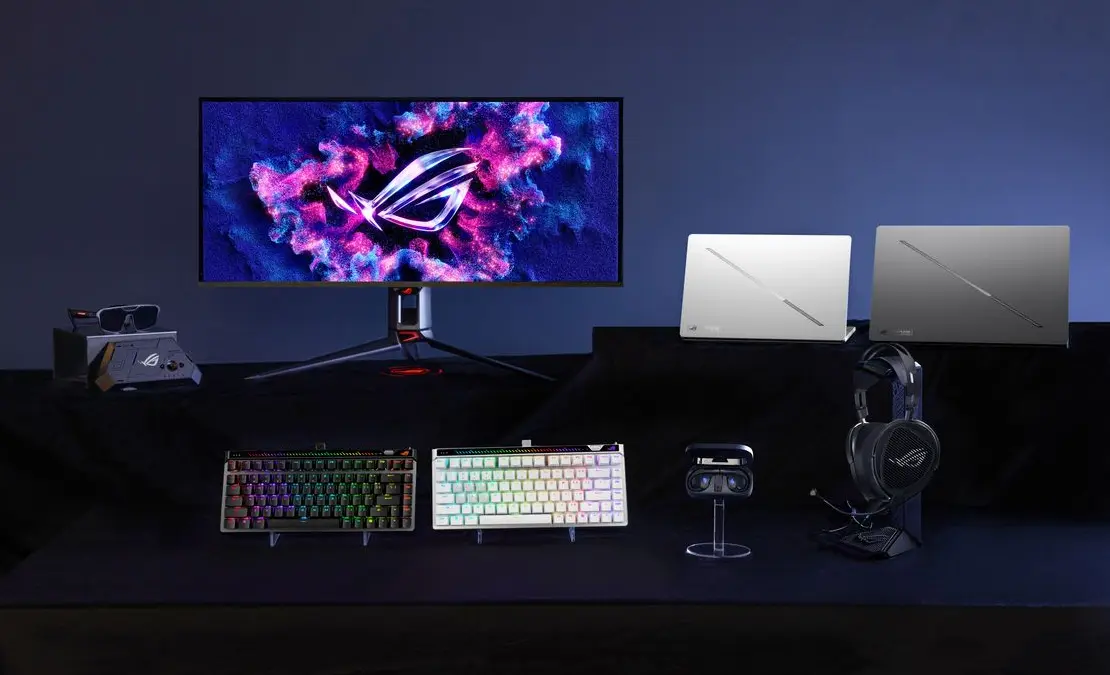

ASUS Republic of Gamers celebrates its 20th anniversary at CES 2026 with an ambitious lineup that spans laptops, desktops, monitors, and peripherals. The announcements include the world’s first dual 16-inch screen gaming laptop (Zephyrus Duo), a desktop PC with holographic fan projection (G1000), next-generation OLED monitors with RGB stripe pixel technology, and a full collaboration with Kojima Productions featuring custom-designed hardware. The refreshed Zephyrus G14 and G16 bring Intel Core Ultra Series 3 processors and NVIDIA GeForce RTX 50 Series GPUs with up to 160W TGP, while new AR glasses developed with XREAL deliver 240Hz micro-OLED displays for spatial gaming. If you’re in the market for gaming hardware in 2026, ROG’s CES showcase covers nearly every category with flagship-tier options.
The Bottom Line
ROG’s 20th anniversary CES lineup delivers world-first innovations across laptops, desktops, monitors, and peripherals, headlined by the dual-screen Zephyrus Duo and holographic G1000 desktop.
Key Announcements:
- ROG Zephyrus Duo with dual 16″ 3K OLED touchscreens
- ROG G1000 desktop with AniMe Holo holographic fan
- ROG x Kojima Productions Flow Z13-KJP and peripherals
- Zephyrus G14/G16 with RTX 50 Series (up to 160W TGP)
- Swift OLED PG27UCWM with Tandem RGB OLED technology
- Swift OLED PG34WCDN with 360Hz QD-OLED and BlackShield film
- XREAL R1 AR glasses with 240Hz micro-OLED
- Kithara planar magnetic headset with HIFIMAN drivers
ROG Zephyrus G14 and G16: Compact Performance Gets a Power Boost
The 2026 Zephyrus G14 (GU405/GA403) and G16 (GU606) maintain the ultraportable design ROG established in previous generations while increasing GPU power delivery by up to 23%. The G14 now supports up to 130W TGP (up from 120W), while the G16 pushes to 160W TGP (up from 130W) in manual mode.
Processor and Graphics Options
| Model | Processor | Max GPU | Max TGP |
|---|---|---|---|
| Zephyrus G14 (GU405) | Intel Core Ultra Series 3 | GeForce RTX 5080 | 130W |
| Zephyrus G14 (GA403) | AMD Ryzen AI | GeForce RTX 5080 | 130W |
| Zephyrus G16 (GU606) | Intel Core Ultra Series 3 | GeForce RTX 5090 | 160W |
Both Intel variants deliver up to 50 TOPS of NPU performance for local AI tasks and Windows Copilot+ certification. The AMD-powered G14 (GA403) offers an alternative for buyers who prefer Ryzen AI processors with on-device AI execution. NVIDIA’s Blackwell architecture powers the RTX 50 Series GPUs, bringing DLSS 4 with Multi Frame Generation for improved frame rates in supported titles.
Display and Thermal Improvements
The new 1100-nit Nebula HDR display represents a significant brightness upgrade over previous generations. ROG’s Nebula HDR engine tuning delivers richer highlights and deeper contrast, while 100% DCI-P3 coverage and Delta E < 1 color accuracy meet professional color standards. Both models add a full-size SD card reader for content creators who need fast media transfer without dongles.
ROG Intelligent Cooling keeps temperatures in check through a redesigned bottom panel, optimized exhaust vents, and liquid metal thermal interface on the CPU. The CNC-milled aluminum chassis with glass-mirror finish and redesigned Slash lighting maintains the Zephyrus aesthetic while improving passive heat dissipation.
ROG Zephyrus Duo: The World’s First Dual 16-Inch Gaming Laptop
The Zephyrus Duo (GX651) pushes laptop design into new territory with two 16-inch 3K ROG Nebula HDR OLED touchscreen displays. Both panels run at 120Hz with 0.2ms response times, and the main display supports NVIDIA G-SYNC for tear-free gaming. The secondary screen tilts upward when you open the laptop, providing additional workspace for streaming overlays, system monitoring, Discord, or creative toolbars.
Dual-Screen Specifications
| Feature | Main Display | Secondary Display |
|---|---|---|
| Size | 16″ | 16″ |
| Resolution | 3K (2880×1800) | 3K (2880×1800) |
| Panel Type | ROG Nebula HDR OLED | ROG Nebula HDR OLED |
| Refresh Rate | 120Hz | 120Hz |
| Response Time | 0.2ms | 0.2ms |
| Touch Support | Yes | Yes |
| G-SYNC | Yes | No |
Five Operating Modes
ROG designed the Zephyrus Duo with five distinct operating modes to match different workflows:
- Standard Mode: Both screens active for maximum productivity
- Gaming Mode: Primary display optimized for performance, secondary for overlays
- Creator Mode: Extended canvas across both displays
- Presentation Mode: Secondary screen as private notes while presenting
- Tablet Mode: Fold flat for touch-centric input
The laptop runs Intel’s latest processors paired with up to a GeForce RTX 5090 Laptop GPU. ROG Intelligent Cooling combines a vapor chamber, dual fans, and dedicated graphite sheet to manage thermals across demanding workloads.
Practical Considerations
The dual-screen design adds weight and complexity compared to traditional gaming laptops. Creators who rely on secondary monitors for reference material or tool palettes benefit most from the form factor. Gamers who stream while playing gain permanent overlay space without sacrificing game visibility. However, if you primarily game on a single display, the added cost and weight of the second panel may not justify the investment.
ROG x Kojima Productions: Collector Hardware Meets Gaming Performance
ROG’s collaboration with Kojima Productions (the studio behind Death Stranding and the Metal Gear Solid series) produces a themed ecosystem centered on the Flow Z13-KJP tablet PC. Legendary artist Yoji Shinkawa designed the exterior artwork featuring Ludens, Kojima Productions’ mascot, turning the hardware into collectible pieces that also deliver competitive gaming performance.
ROG Flow Z13-KJP: 2-in-1 Gaming Tablet
| Component | Specification |
|---|---|
| Display | 13.4″ 2.5K Nebula HDR touchscreen, 180Hz, 100% DCI-P3 |
| Processor | AMD Ryzen AI Max+ 395 |
| Graphics | AMD Radeon 8060S integrated |
| NPU | 50 TOPS |
| Form Factor | Detachable keyboard, tablet mode, laptop mode |
| Design | Yoji Shinkawa artwork, custom packaging, Ludens themes |
The Ryzen AI Max+ 395 processor with Radeon 8060S graphics delivers desktop-class performance in a tablet form factor. The 50 TOPS NPU handles on-device AI acceleration for tasks like upscaling and noise reduction. You can use the Flow Z13-KJP as a gaming console (with controller), creator tablet (with stylus), workstation (docked), or ultraportable laptop (with keyboard attached).
Kojima Productions Peripheral Collection
The collaboration extends beyond the tablet to a complete peripheral set:
- ROG Delta II-KJP Headset: 50mm titanium-plated drivers, 10mm super-wideband microphone, DualFlow Audio dual-device connectivity, SpeedNova wireless, 100-hour battery life
- ROG Keris II Origin-KJP Mouse: 63-gram weight, 42,000 DPI ROG AimPoint Pro optical sensor, three-zone RGB, SpeedNova wireless
- ROG Scabbard II XXL-KJP Mouse Pad: Hand-drawn Ludens motif by Yoji Shinkawa, water/oil/dust-repellent surface
The Kojima Productions collection appeals to fans who want functional gaming hardware with collector value. The Shinkawa artwork transforms standard peripherals into display pieces, though the core specifications match non-themed ROG products at similar price points.
ROG G1000 Desktop: Holographic Fan Projection Meets Flagship Performance
The ROG G1000 introduces the AniMe Holo, a holographic fan system that projects customizable visuals from within the chassis. The world’s first holographic fan in a prebuilt gaming PC transforms the case into a display surface for animations, system stats, or personal artwork.
Holographic Innovation in Practice
ROG houses the AniMe Holo module in an independent chamber with a hinge-door design. This isolation serves two purposes: it prevents the holographic system from interfering with the main components’ thermal path, and it reduces vibration-induced noise from the Holo system. You can customize projections through Armoury Crate software, displaying ROG animations, system information, or imported graphics.
Thermal and Performance Architecture
| Component | Specification |
|---|---|
| Cooling | ROG Thermal Atrium, 420mm AIO liquid cooler, three fans, isolated airflow |
| GPU Options | ROG Astral GeForce RTX 5090/5080, ROG Strix RTX 5070 Ti, AMD Radeon RX 9070 XT |
| Memory | Up to 128GB DDR5 |
| Storage | Up to 4TB PCIe 4.0 SSD |
| Chassis | 104L ATX ultra tower |
| Quick Controls | Fan Key for one-touch thermal boost |
The ROG Thermal Atrium dedicates a cooling zone specifically for the CPU, channeling fresh air through the 420mm AIO with isolated airflow paths. The 104L ultra tower chassis provides space for graphics cards up to 400mm, dual 360mm radiators, and up to 14 120mm fans. Aura Sync enables RGB coordination across the GPU, cooling fans, water-cooling blocks, and AniMe Holo system.
Each G1000 unit ships validated for stability, reducing the setup time and troubleshooting typical of self-built systems. The prebuilt approach suits buyers who want flagship performance without component selection and assembly.
ROG Crosshair Motherboards: Flagship AMD Platforms with AI Optimization
ROG Crosshair X870E Glacial
The Crosshair X870E Glacial targets extreme overclockers and enthusiasts who need maximum power delivery and connectivity. The board earned a CES 2026 Innovation Award in the Computer Hardware & Components category.
Power and Overclocking:
- 24+2+2 power stages
- Dynamic OC Switcher
- Core Flex for efficiency optimization
- AI Overclocking for automated tuning
Storage Configuration:
- Seven M.2 slots total
- Two PCIe 5.0 onboard
- Two additional PCIe 5.0 via Hyper M.2
- Two PCIe 4.0 via Q-DIMM.2
Connectivity:
- Dual USB4 ports
- Dual USB 20Gbps Type-C front connectors (one with Quick Charge 4+ up to 60W)
- Twelve USB 10Gbps ports
- Dual Realtek 10G Ethernet
AI Features:
- AI Cache Boost for performance optimization
- ASUS AI Advisor for system guidance
- 5-inch full-color LCD for monitoring
ROG Crosshair X870E Dark Hero
The Dark Hero variant balances advanced thermal management with a subdued aesthetic for builders who prefer stealth over RGB illumination.
Storage and Connectivity:
- Two PCIe 5.0 M.2 slots
- Three PCIe 4.0 M.2 slots
- Wi-Fi 7
- Dual USB4 ports
- Front-panel USB Type-C
Both Crosshair boards include installation conveniences like PCIe Slot Q-Release Switch, AIO Q-Connector, and SafeSlots for tool-free component mounting.
ROG Strix Neo Series
For mainstream AMD builds, ROG offers the Strix Neo lineup:
- ROG Strix X870E-E Gaming WiFi7 Neo: Top-tier performance with full feature set
- ROG Strix X870E-A Gaming WiFi7 Neo: Strong performance with refined aesthetics
- ROG Strix B850-F Gaming WiFi7 Neo: Balanced mainstream option
- ROG Strix B850-A Gaming WiFi7 Neo: Entry-level efficiency
All Neo series boards include AI-driven optimization and Wi-Fi 7 connectivity.
ROG Swift OLED Monitors: RGB Stripe Pixel Technology Arrives
ROG maintains its position as the global leader in OLED gaming monitors with two flagship displays featuring RGB stripe pixel technology. The shift from WOLED (with white subpixel) to pure RGB pixels delivers up to 27% larger color volume at high luminance levels.
ROG Swift OLED PG27UCWM: Tandem RGB OLED
| Specification | Detail |
|---|---|
| Panel Size | 26.5″ |
| Panel Type | Tandem RGB OLED (no white subpixel) |
| Resolution | 4K (3840×2160) |
| Refresh Rate | 4K @ 240Hz or FHD @ 480Hz (dual mode) |
| Response Time | 0.03ms |
| Color Gamut | 99% DCI-P3, true 10-bit |
| Color Accuracy | Delta E < 2 |
| HDR | Dolby Vision support |
| Connectivity | DisplayPort 2.1a UHBR20 (80Gbps), HDMI 2.1, USB-C (90W PD) |
| Design | Transparent back panel |
The dual-mode feature lets you switch between 4K at 240Hz for immersive gaming and FHD at 480Hz for competitive esports where frame rate trumps resolution. RGB stripe pixel technology ensures sharp text edges and accurate color reproduction across the entire luminance range.
ROG Swift OLED PG34WCDN: QD-OLED Ultrawide
| Specification | Detail |
|---|---|
| Panel Size | 34″ |
| Panel Type | QD-OLED with RGB stripe |
| Resolution | WQHD (3440×1440) |
| Curve | 1800R |
| Surface | Semi-glossy |
| Refresh Rate | 360Hz |
| Response Time | 0.03ms GTG |
| Color Gamut | 99% DCI-P3, 10-bit |
| Color Accuracy | Delta E < 2 |
| HDR | VESA DisplayHDR 500 True Black |
| Connectivity | DisplayPort 2.1a UHBR20 (80Gbps), HDMI 2.1, USB-C (90W PD) |
The ROG BlackShield film applied to the PG34WCDN provides 2.5 times better scratch resistance than previous QD-OLED panels while boosting perceived black levels by up to 40%. The semi-glossy surface reduces reflections compared to fully glossy OLED panels without sacrificing the deep blacks that define OLED image quality.
OLED Care Features
Both monitors include OLED Care Pro with Neo Proximity Sensor that detects user presence and adjusts display behavior to prevent burn-in. ROG Gaming AI features like Dynamic Shadow Boost (brightening dark areas without blowing highlights) and Dynamic Crosshair (adaptive reticle visibility) enhance competitive gameplay.
ROG XREAL R1 Gaming Glasses: 240Hz Spatial Display
ROG partnered with XREAL to create the R1 Gaming Glasses, featuring the world’s first 240Hz micro-OLED FHD AR display designed specifically for gaming. The glasses connect through the ROG Control Dock, which provides compatibility across PC, console, and ROG Ally devices.

Display Specifications
| Feature | Specification |
|---|---|
| Resolution | 1920 x 1080 (FHD) |
| Refresh Rate | 240Hz |
| Motion-to-Photon Latency | 3ms |
| Virtual Screen Size | 171″ at 4 meters |
| Field of View | Up to 57° |
| Tracking | Native 3DoF Anchor mode |
| Audio | Sound by Bose spatial audio |
| Lens Technology | Electrochromic auto-adjusting transparency |
The 3DoF Anchor mode pins your virtual screen in space without requiring external tracking or PC-side rendering. All processing happens on the glasses themselves. Electrochromic lenses automatically adjust transparency based on ambient lighting, letting you see your surroundings or block them out for immersion.
Practical Use Cases
The XREAL R1 glasses suit several scenarios:
- ROG Ally portable gaming: Giant-screen experience without a monitor
- Desktop extension: Private secondary display for sensitive content
- Travel gaming: Full gaming setup in a glasses case
- Couch console gaming: Personal screen without occupying the TV
The 3ms motion-to-photon latency keeps visuals responsive for gaming, though competitive esports players may still prefer dedicated monitors for optimal input lag. The Bose spatial audio creates positional awareness without headphones, though you sacrifice isolation in noisy environments.
ROG Kithara: Audiophile-Grade Planar Magnetic Headset
ROG collaborated with HIFIMAN to develop the Kithara, a planar magnetic gaming headset that brings audiophile-grade sound reproduction to gaming. The 100mm HIFIMAN planar magnetic drivers operate across an 8Hz to 55kHz frequency range with exceptionally low distortion.
Audio Specifications
| Component | Specification |
|---|---|
| Driver Type | 100mm HIFIMAN planar magnetic |
| Frequency Response | 8Hz–55kHz |
| Design | Open-back |
| Microphone | Full-band MEMS boom, 20Hz–20kHz |
| Cable | 3-in-1 with 4.4mm balanced, 3.5mm, 6.3mm plugs |
| Included Accessories | USB-C adapter for portable devices |
The open-back design creates an expansive soundstage that enhances spatial awareness for in-game audio cues like footsteps, gunfire direction, and environmental sounds. The trade-off involves sound leakage and reduced noise isolation compared to closed-back designs.
Dual 3.5mm inputs prevent crosstalk between audio channels, maintaining separation during competitive play. The MEMS microphone captures voice across the full audible spectrum with minimal distortion for clear team communication.
ROG Cetra Open Wireless: Open-Ear Gaming Earbuds
The Cetra Open Wireless earbuds deliver gaming audio while maintaining environmental awareness through an open-ear design. Dual-mode connectivity supports both Bluetooth for casual use and 2.4GHz ROG SpeedNova wireless for low-latency gaming.
Key Features
- Drivers: 14.2mm Diamond-Like Carbon-coated
- Connectivity: Bluetooth and 2.4GHz SpeedNova wireless
- Charging: USB-C one-way passthrough (charge while playing)
- Audio Modes: Phantom Bass, Immersion Mode
- Durability: IPX5 splash-proof
- Accessories: Ergonomic soft ear hooks, reflective detachable neck strap
The open-ear design suits gamers who need to hear doorbells, conversations, or other real-world sounds while playing. The Diamond-Like Carbon coating on the drivers improves response speed and reduces distortion compared to standard dynamic drivers.
ROG Falchion Ace 75 HE: Hall Effect Magnetic Switches
The Falchion Ace 75 HE keyboard features hot-swappable ROG HFX V2/V2X magnetic switches with adjustable actuation from 0.1mm to 3.5mm in 0.01mm increments. The new ROG Hall Sensor reduces electromagnetic interference for consistent actuation across all keys.
Keyboard Specifications
| Feature | Specification |
|---|---|
| Layout | 75% |
| Switch Type | ROG HFX V2/V2X magnetic (hot-swappable) |
| Actuation Range | 0.1–3.5mm (0.01mm precision) |
| Polling Rate | 8000Hz (0.125ms response) |
| Controls | Onboard adjustment wheel, interactive touch panel |
| Dampening | Six-layer acoustic dampening |
| Keycaps | ROG Doubleshot PBT |
| Portability | Protective carry case included |
The 8000Hz polling rate registers keystrokes in 0.125ms, which ROG claims is up to eight times faster than competitor devices. The onboard adjustment wheel provides real-time actuation and Rapid Trigger tuning without software, useful for competitive players who need quick adjustments between games or rounds.
ROG Cronox: Panoramic Full-Tower Case with BTF Support
The Cronox full-tower case combines curved tempered glass, brushed aluminum, and a 9.2-inch LCD screen module for visual customization. The case supports ASUS BTF (Back-To-Front) hidden connector motherboards for cable-free aesthetics.
Design and Cooling Features
- Glass Panel: Curved tempered glass for panoramic component display
- LCD Module: 9.2-inch, 60Hz, rotatable hinge for stats or custom visuals
- Fan Bracket: Patented rotatable side bracket for adjustable airflow
- GPU Mount: Patented tool-free graphics card slot clamp
- GPU Clearance: Up to 400mm
- Radiator Support: Dual 360mm
- Fan Capacity: Up to 14 120mm fans


The rotatable side fan bracket lets you angle airflow toward specific components, optimizing cooling for your particular GPU and CPU configuration. The tool-free GPU clamp simplifies installation and removal for maintenance or upgrades.
ROG Eurux GR120 ARGB: Premium Case Fans
The Eurux GR120 ARGB fans use liquid-crystal-polymer (LCP) blades for high-speed performance up to 2600 RPM while maintaining 33dB(A) noise levels.
Fan Specifications
| Metric | Value |
|---|---|
| Speed | Up to 2600 RPM |
| Static Pressure | 4.6 mmH₂O |
| Airflow | 91 CFM |
| Noise | 33dB(A) |
| Lighting | Three independent ARGB zones |
| Connection | Patented daisy-chain |
| Controller | Bundled (3-pack), supports up to 14 fans |
The daisy-chain connectors reduce cable clutter by linking fans sequentially rather than running individual cables to a hub. Armoury Crate provides 10 preset lighting effects with full custom mode access.
ROG AIO Coolers: Strix SLC/LC IV and Ryuo IV Series
ROG Strix SLC/LC IV Series
The Strix SLC/LC IV AIO coolers feature the AIO Q-Connector, which transmits pump, fan, and ARGB signals through a row of metal contacts. This eliminates the multiple cables typical of AIO installations, creating cleaner builds with minimalist aesthetics.
Key Features:
- Triple-fan design with Aura Fan Edge lighting
- Integrated display for system stats, animations, or custom content
- ASUS InfoHub software for display management
- Available in short-tube and standard-tube versions
- Black and white color options
ROG Ryuo IV 360 ARGB
The Ryuo IV features a movable curved 6.67-inch AMOLED display that creates 3D-effect visuals on the pump head. The Asetek Emma Gen 8 V2 pump delivers higher flow rates and lower impedance than previous generations.
Key Features:
- 6.67-inch curved AMOLED display (movable)
- Asetek Emma Gen 8 V2 pump
- Pre-mounted daisy-chained ARGB fans
- Front and side lighting zones
- Short-tube variant available
- Black and white color options
Pricing and Availability
ROG has not announced specific pricing or availability dates for individual products at the time of the CES 2026 announcement. The company typically releases pricing closer to retail availability, which varies by region and product category. CES attendees can view all announced products at The Venetian Expo, Level 3, San Polo #3403, from January 5-8, 2026.
20 Years of ROG: From Crosshair to Holographic Fans
ROG launched in 2006 with the original Crosshair motherboard, establishing a brand identity built on overclocking, extreme performance, and distinctive aesthetics. Two decades later, the brand spans every PC gaming category from motherboards and graphics cards to laptops, desktops, monitors, peripherals, and now AR glasses.
The “For Those Who Dare” philosophy connects early overclocking experiments with 2026’s holographic fan projections and rollable laptop concepts. ROG Lab, the company’s experimental division, develops proof-of-concept technologies that often appear in consumer products within one to three years.
Who Should Consider ROG’s CES 2026 Products
The Zephyrus Duo suits you if: You need a portable workstation with permanent secondary display space, stream while gaming, or work in creative applications that benefit from extended screen real estate. The dual-screen design adds weight and cost, so single-display users should consider the standard Zephyrus G14 or G16.
The G1000 desktop fits your needs if: You want flagship prebuilt performance with visual customization, prefer validated systems over self-built PCs, or want the AniMe Holo as a conversation piece and status symbol.
The Kojima Productions collection works best if: You’re a fan of Hideo Kojima’s work and want functional gaming hardware with collector value. The specifications match standard ROG products, so the premium covers design and packaging.
The Swift OLED monitors make sense if: You need the fastest OLED gaming displays available, work with HDR content professionally, or want the best contrast ratios and color accuracy for competitive gaming.
The XREAL R1 glasses suit you if: You game on ROG Ally or laptop away from home, want private screen space without a monitor, or travel frequently and need portable large-screen gaming.
Frequently Asked Questions
When will ROG’s CES 2026 products be available to buy?
ROG announced the products without specific release dates or pricing. Historically, CES-announced laptops and monitors ship within two to four months, while experimental products like the Zephyrus Duo may take longer due to manufacturing complexity.
Is the Zephyrus Duo worth the premium over a single-screen laptop?
The dual-screen design benefits streamers, content creators, and multitaskers who use secondary monitors for tools, chat, or reference material. If you primarily game on a single display, the extra cost and weight may not justify the investment.
How does the AniMe Holo holographic fan actually work?
The AniMe Holo projects customizable images using persistence of vision technology on a spinning fan blade. ROG isolates the module in a separate chamber to prevent thermal interference with the main components and reduce vibration noise.
What’s the difference between the Swift OLED PG27UCWM and PG34WCDN?
The PG27UCWM uses Tandem RGB OLED technology in a 26.5-inch 4K panel with dual 240Hz/480Hz modes. The PG34WCDN uses QD-OLED technology in a 34-inch ultrawide 1440p panel at 360Hz. Choose the PG27UCWM for 4K resolution and the PG34WCDN for ultrawide immersion and higher refresh rates.
Do the XREAL R1 glasses work with non-ROG devices?
The ROG Control Dock provides connectivity to PC, console, and ROG Ally. XREAL’s standard glasses work with most USB-C DisplayPort devices, but the R1’s ROG-specific features may require ROG hardware for full functionality.
Is the ROG Kithara headset worth it for gaming, or is it overkill?
The HIFIMAN planar magnetic drivers deliver audiophile-grade sound that exceeds typical gaming headset quality. If you value precise audio positioning and musical fidelity, the investment provides noticeable improvements. For casual gaming, standard gaming headsets offer adequate performance at lower prices.

